- Thread starter
- #31


Navigation
Install the app
How to install the app on iOS
Follow along with the video below to see how to install our site as a web app on your home screen.
Note: This feature may not be available in some browsers.
More options
Style variation
You are using an out of date browser. It may not display this or other websites correctly.
You should upgrade or use an alternative browser.
You should upgrade or use an alternative browser.
XBox 360 Recompilations
- Thread starter sleevel
- Start date

- 11 September 2006
Oh man, I've tested it myself, simply can't believe it! Had time to just start it and play very little, so I've no idea about later crashes or whatnot, but forgetting the brightess (maybe my settings), it's incredibly smooth, it runs way, way better than the Rpcs3 Fifas!
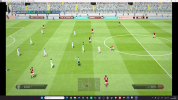
To think that the last time I read about it, Ps4 emulation looked years far. Just incredible, I think gaming wise we'll be in some incredible places very very soon.
To think that the last time I read about it, Ps4 emulation looked years far. Just incredible, I think gaming wise we'll be in some incredible places very very soon.

DevPlays
Mr. Perfect
- 11 January 2021
Display Colours are currently bugged, that's why the washed out colours, not your fault. Even with that, the progression is simply extraordinary.Oh man, I've tested it myself, simply can't believe it! Had time to just start it and play very little, so I've no idea about later crashes or whatnot, but forgetting the brightess (maybe my settings), it's incredibly smooth, it runs way, way better than the Rpcs3 Fifas!
View attachment 450397
To think that the last time I read about it, Ps4 emulation looked years far. Just incredible, I think gaming wise we'll be in some incredible places very very soon.

- Thread starter
- #35

sleevel
League 1
- 6 November 2024
I have an AMD and am not seeing the color washout issue. I was getting the pitch not loading at all, but I was able to fix that with emulator settings. I noticed a kickoff restart bug where replays weren’t being correctly called and players would stand in an odd position at kickoff but I was able to modify the shadPS4 code and rebuild it to resolve this. I’m noticing some other minor graphical quirks: player names on kits appear as horizontal lines, player texture joins form scar looking seams on players, stadium lights go through the crowd. Other than that, this plays remarkably. Much better than RPCS3 - that emulator destroys my relatively underpowered hardware but this plays more like Xenia - just sort of “works” with the occasional graphical bug.Display Colours are currently bugged, that's why the washed out colours, not your fault. Even with that, the progression is simply extraordinary.
the bit about modifying and rebuilding shad ps4, can you explain a bit more please mate, i fear it might be beyond my capabilities but I'd love to know what you meanI have an AMD and am not seeing the color washout issue. I was getting the pitch not loading at all, but I was able to fix that with emulator settings. I noticed a kickoff restart bug where replays weren’t being correctly called and players would stand in an odd position at kickoff but I was able to modify the shadPS4 code and rebuild it to resolve this. I’m noticing some other minor graphical quirks: player names on kits appear as horizontal lines, player texture joins form scar looking seams on players, stadium lights go through the crowd. Other than that, this plays remarkably. Much better than RPCS3 - that emulator destroys my relatively underpowered hardware but this plays more like Xenia - just sort of “works” with the occasional graphical bug.
i have the same issue after a goal where the replay doesn't trigger and the players just stand around the centre circle, apart from that though it runs great after a bit of tweaking
- Thread starter
- #37
sleevel
League 1
- 6 November 2024
JamieH, try this: https://www.mediafire.com/file/ypaskjv1hddv8jr/shadps4.exe/filethe bit about modifying and rebuilding shad ps4, can you explain a bit more please mate, i fear it might be beyond my capabilities but I'd love to know what you mean
i have the same issue after a goal where the replay doesn't trigger and the players just stand around the centre circle, apart from that though it runs great after a bit of tweaking
See if that clears up the replay issue.
thanks palJamieH, try this: https://www.mediafire.com/file/ypaskjv1hddv8jr/shadps4.exe/file
See if that clears up the replay issue.
- Thread starter
- #39
sleevel
League 1
- 6 November 2024
All, try out this shadPS4 build for FIFA14, it should resolve brightness issues, replay issues, and names on kits appearing as horizontal lines. If it works for you, or you uncover additional bugs, please let me know.
https://www.mediafire.com/file/ypaskjv1hddv8jr/shadps4.exe/file
https://www.mediafire.com/file/ypaskjv1hddv8jr/shadps4.exe/file

Marlon Anthony
Purist
Hi, how did you fix the pitch not loading? Just tested this game with your latest build and I'm still getting a black pitch.I have an AMD and am not seeing the color washout issue. I was getting the pitch not loading at all, but I was able to fix that with emulator settings. I noticed a kickoff restart bug where replays weren’t being correctly called and players would stand in an odd position at kickoff but I was able to modify the shadPS4 code and rebuild it to resolve this. I’m noticing some other minor graphical quirks: player names on kits appear as horizontal lines, player texture joins form scar looking seams on players, stadium lights go through the crowd. Other than that, this plays remarkably. Much better than RPCS3 - that emulator destroys my relatively underpowered hardware but this plays more like Xenia - just sort of “works” with the occasional graphical bug.
i followed the settings in the video at the top of the page and that sorted the black pitch for meHi, how did you fix the pitch not loading? Just tested this game with your latest build and I'm still getting a black pitch.
- Thread starter
- #42
sleevel
League 1
- 6 November 2024
I’m not at my computer but one of the GPU settings by default is false and swapping to true brings back the pitch. Change these in the config.json in your local app data folder.

Sami 1999
Noob
- 28 June 2015
How do I use this with the qt launcher?JamieH, try this: https://www.mediafire.com/file/ypaskjv1hddv8jr/shadps4.exe/file
See if that clears up the replay issue.
Sami 1999
Noob
- 28 June 2015
Still getting the black lines around the player models visual bug, anyone managed to fix that?
Also increasing the vblank from 60hz to 120hz doesn't seem to uncap the framerate either.
Also increasing the vblank from 60hz to 120hz doesn't seem to uncap the framerate either.
Marlon Anthony
Purist
Thanks, that did the trick. Mind blowing to be able to finally play this on my PC after being in PS4 jail over 10 years.i followed the settings in the video at the top of the page and that sorted the black pitch for me
- Thread starter
- #46
sleevel
League 1
- 6 November 2024
If by black lines you mean the scar-looking texture joins on players, yes that’s been resolved. I can share my config settings later.Still getting the black lines around the player models visual bug, anyone managed to fix that?
Also increasing the vblank from 60hz to 120hz doesn't seem to uncap the framerate either.
Regarding framerate, I’m working on this. Like the Xbox 360 games, it’s much more invasive than a toggle - it requires some engine level modifications.
- Thread starter
- #47
sleevel
League 1
- 6 November 2024
Launch it directly from the command prompt with -g, followed by the folder location of your extracted game.How do I use this with the qt launcher?
i know mate, I'm hoping this means it's a step closer to it being able to be modded. I'd love a retro season patch on the fifa 14 ng engineThanks, that did the trick. Mind blowing to be able to finally play this on my PC after being in PS4 jail over 10 years.
It worked for me. Still some lags and stuttering but kits and replay issues are fixedAll, try out this shadPS4 build for FIFA14, it should resolve brightness issues, replay issues, and names on kits appearing as horizontal lines. If it works for you, or you uncover additional bugs, please let me know.
https://www.mediafire.com/file/ypaskjv1hddv8jr/shadps4.exe/file
Sami 1999
Noob
- 28 June 2015
Sorry mate, I need a bit more clarification. My dumb brain can't do commandline things. Every time I click on shadps4.exe, the command line opens and tells me to download qt launcher- if I click ok, the command line closes. So I don't even get an opportunity to type -g "rom location" at all.Launch it directly from the command prompt with -g, followed by the folder location of your extracted game.
I tried to add the shadps4.exe as custom build through the qt launcher:
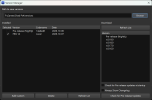
This likely worked however I still see the black lines on player models- mainly on indirect lighting.
- Thread starter
- #51
sleevel
League 1
- 6 November 2024
Make sure your config.json has:
"readback_linear_images_enabled": true,
This will ensure the pitch is not black.
The black lines on players during night games with floodlights is still present. I’m working on this and 144 Hz presentation.
"readback_linear_images_enabled": true,
This will ensure the pitch is not black.
The black lines on players during night games with floodlights is still present. I’m working on this and 144 Hz presentation.
Sami 1999
Noob
- 28 June 2015
While uncapping the framerate, the cloth physics might break and become faster. You will have to keep that in mind.
I tried to increase the resolution but failed so far. Game looks pretty rough on a 4k monitor because of the low resolution.
I tried to increase the resolution but failed so far. Game looks pretty rough on a 4k monitor because of the low resolution.
- Thread starter
- #53
sleevel
League 1
- 6 November 2024
Try this. Should resolve the black lines, uncap frame rates, and allow resolutions up to 8k.While uncapping the framerate, the cloth physics might break and become faster. You will have to keep that in mind.
I tried to increase the resolution but failed so far. Game looks pretty rough on a 4k monitor because of the low resolution.
https://www.mediafire.com/file/ypaskjv1hddv8jr/shadps4.exe/file
In your config.json, this parameter controls resolution. 1.0 is 1080p. 2.0 is 4k. 4.0 is 8k. Fractional resolutions of 1.25 and 1.5 are also supported (since I need them on my hardware).
You can add this line to your config.json under "GPU {", or if you can't be arsed (to borrow a phrase from my Brits), you can download this and replace it in your App/Roaming/shadps4 folder. It is set to 2.0 resolution scale (4k):
https://www.mediafire.com/file/grgmwq5ccnl5suc/config.json/file
"resolution_scale": 2.0,
Sami 1999
Noob
- 28 June 2015
Try this. Should resolve the black lines, uncap frame rates, and allow resolutions up to 8k.
https://www.mediafire.com/file/ypaskjv1hddv8jr/shadps4.exe/file
In your config.json, this parameter controls resolution. 1.0 is 1080p. 2.0 is 4k. 4.0 is 8k. Fractional resolutions of 1.25 and 1.5 are also supported (since I need them on my hardware).
You can add this line to your config.json under "GPU {", or if you can't be arsed (to borrow a phrase from my Brits), you can download this and replace it in your App/Roaming/shadps4 folder. It is set to 2.0 resolution scale (4k):
https://www.mediafire.com/file/grgmwq5ccnl5suc/config.json/file
"resolution_scale": 2.0,
Thanks! Looks much better now. However, the cutscene and replay framerates have been uncapped but stuck at exactly 43 FPS whereas gameplay and main menu has been fully uncapped.
GPU and CPU is mostly idling [5070 ti+ 9800x3d]. Tested with both vsync- uncapped (immediate) and also setting vblank to 120hz and higher but the cutscene fps remains stuck at 43.
Btw, improving the player LODs work just like FIFA 15 and 16 and you can use CG File explorer to regenerate the bh to get modified files to work. I attached the improved LODs. Put it on "\CUSA00128/FIFA 14 folder\data\fifarna\lua" folder and regenerate the bh. LODs look much better now but I haven't managed to kit the shirt's physics to work during gameplay yet. Its still completely static while the pants move. There is some other trigger for the shirt physics. If someone manages to find it out, lmk.
Here's 4k capture with increased LODs:
Last edited:
Marlon Anthony
Purist
Thanks, but I tried both the new exe and your config but it doesn't seem to have made a difference?Try this. Should resolve the black lines, uncap frame rates, and allow resolutions up to 8k.
https://www.mediafire.com/file/ypaskjv1hddv8jr/shadps4.exe/file
In your config.json, this parameter controls resolution. 1.0 is 1080p. 2.0 is 4k. 4.0 is 8k. Fractional resolutions of 1.25 and 1.5 are also supported (since I need them on my hardware).
You can add this line to your config.json under "GPU {", or if you can't be arsed (to borrow a phrase from my Brits), you can download this and replace it in your App/Roaming/shadps4 folder. It is set to 2.0 resolution scale (4k):
https://www.mediafire.com/file/grgmwq5ccnl5suc/config.json/file
"resolution_scale": 2.0,
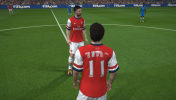
I think you're missing the LOD attachment from your post my friend?Btw, improving the player LODs work just like FIFA 15 and 16 and you can use CG File explorer to regenerate the bh to get modified files to work. I attached the improved LODs. Put it on "\CUSA00128/FIFA 14 folder\data\fifarna\lua" folder and regenerate the bh. LODs look much better now but I haven't managed to kit the shirt's physics to work during gameplay yet. Its still completely static while the pants move. There is some other trigger for the shirt physics. If someone manages to find it out, lmk.
Sami 1999
Noob
- 28 June 2015
Thanks, but I tried both the new exe and your config but it doesn't seem to have made a difference?
View attachment 451386
I think you're missing the LOD attachment from your post my friend?
Dang, what the hell. It looks like it didn't attach because the site doesn't support attaching lua files.
Here's link from external site instead: settings.lua
- Thread starter
- #57
sleevel
League 1
- 6 November 2024
@Sami 1999 , try SIMPLECLOTH=1 in the cl.ini - it should make shirts and shorts use cloth physics.
- Thread starter
- #58
sleevel
League 1
- 6 November 2024
And try this: it has unlocked replay framerates. https://www.mediafire.com/file/ypaskjv1hddv8jr/shadps4.exe/file@Sami 1999 , try SIMPLECLOTH=1 in the cl.ini - it should make shirts and shorts use cloth physics.
Sami 1999
Noob
- 28 June 2015
And try this: it has unlocked replay framerates. https://www.mediafire.com/file/ypaskjv1hddv8jr/shadps4.exe/file
Absolutely incredible! The cutscenes and replays are fully uncapped.
For stutter free experience, I recommend capping the framerate to either 60 or multiple of 60 eg: 120, 240 FPS etc because cutscene and replay camera panning suffers from stutters otherwise.
I decided to lock the game to 60 FPS [vblank set to default 60hz] for now since on cutscenes and replays, I can't maintain a steady 120 FPS on my pc [5070 ti, 9800 x3d]. GPU and CPU usage doesn't reach anywhere about 50-60% though. So there might be room for performance improvements in the future. However, a locked 60 FPS gameplay+ cutscene has been possible with this spec at 4k and it looks incredible!
Also that SIMPLECLOTH=1 in the cl.ini [cl.ini on root folder of the game] worked wonders! I never knew the solution was this simple. This will work on FIFA 15 and 16 pc ports too right? Just this change+ increased LODs alone made the visuals during gameplay incredible, especially with 14 since the shirt cloth physics are noticeable even from gameplay camera.
Dynamic camera seems to be missing from this game though. In future, I'd like to mess with the camera values to see if I can match dynamic camera zoom. Porting the FIFA 15 camera.dat files might work, will fiddle with that.
- Thread starter
- #60
sleevel
League 1
- 6 November 2024
Excellent - I’m glad it’s working for you. Those videos look great.Absolutely incredible! The cutscenes and replays are fully uncapped.
For stutter free experience, I recommend capping the framerate to either 60 or multiple of 60 eg: 120, 240 FPS etc because cutscene and replay camera panning suffers from stutters otherwise.
I decided to lock the game to 60 FPS [vblank set to default 60hz] for now since on cutscenes and replays, I can't maintain a steady 120 FPS on my pc [5070 ti, 9800 x3d]. GPU and CPU usage doesn't reach anywhere about 50-60% though. So there might be room for performance improvements in the future. However, a locked 60 FPS gameplay+ cutscene has been possible with this spec at 4k and it looks incredible!
Also that SIMPLECLOTH=1 in the cl.ini [cl.ini on root folder of the game] worked wonders! I never knew the solution was this simple. This will work on FIFA 15 and 16 pc ports too right? Just this change+ increased LODs alone made the visuals during gameplay incredible, especially with 14 since the shirt cloth physics are noticeable even from gameplay camera.
Dynamic camera seems to be missing from this game though. In future, I'd like to mess with the camera values to see if I can match dynamic camera zoom. Porting the FIFA 15 camera.dat files might work, will fiddle with that.
The game had a predefined upper memory limit to avoid crashes, which was necessary to increase to permit 4K and 8K resolutions. It’s possible you are hitting a new upper software memory limit on cutscenes. I don’t have the hardware you do, so it’s difficult for me to validate, but I can mess around with a few things so you can try.
I suspect but have not validated that replacement assets would be similar to FIFA 16, given that it’s the same engine, so utilizing Harry Balzak’s latest mod or the classic patch with this game may be feasible.