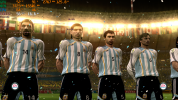
FiFA [2006-2011] Next gen ports via RPCS3 and Xenia

This is the approach I'm using.
DB from Xbox 360 (because on Xbox 360 the data0.big file doesn't seem to be encrypted, so its .bh file can be regenerated directly without having to convert the .sdat to .big then regenerating then putting the .sdat back into place instead of the .big), .rx3 files from PS3 (as the Xbox 360 files don't seem to work with RX3 master).
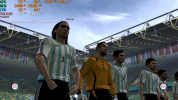
I also moved back to Xbox 360 (via Xenia Edge this time) for the 2010 World Cup game, as it looks like I finally found a balance between detail and performance. On top of that, Xbox 360 doesn't suffer from the "solid" back names issue, a thing that happened on PS3 and which I managed to overcome by putting "resolution scale" to 300%... Only to discover that names disappear/fade ourt in cutscenes now.

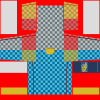
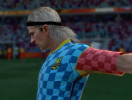
Currently testing the "texture borders" on those kits (as they're different from the ones used from FIFA 11 onwards), so I could start making my kits eventually (some of you might remember that I used to make kits back in the day both for PES and for FIFA):

View attachment 430560

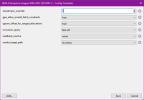
For 2010 World Cup, you can set "occlusion_query = fast" and set "readback_resolve = none" on Xenia Edge. This game doesn't seem to suffer from lighting issue with readback_resolve = none and that gives a huge performance boost.


As for 2014 World Cup, you can fix the dark/black pitch issue by setting readback_resolve = strict. But it will bring your performance to it's knees. A trick however is once you get into a match and the pitch is no longer dark, open the config menu on Xenia edge (pressing home button on controller works) and set readback_resolve = none. The lighting will remain stable for that match. Once you are done, you have to set it back to strict on the main menus before selecting a new team and match and rinse repeat.

Also good news = https://github.com/has207/xenia-edge/issues/199#issuecomment-4889976460

The missing 3D grass and goal net problem has been completely fixed thanks to swift response from the dev. Latest Xenia Edge release should be useable again.
 
This time of year my love for football games always comes back. With how bad the newer football titles have been lately, I’ve realized just how much I miss the old ones. FIFA 07 and FIFA 08 on the Xbox 360 are still super fun even today. Those games were way ahead of their time, and back then we didn’t even realize it. Honestly, I’ve been thinking about picking up an Xbox 360 again just to play those 7th‑gen football games instead of messing around with emulators. I am glad that i am not alone loving these games. Call me crazy but i would pay 60 dolars to play these games on current gen consoles with enhancements like 4K 60 FPS HDR etc.
 
1783423466701.png
1783423667826.png

Renderer: Vulkan

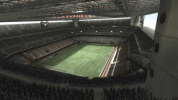
UEFA Champions League 2006-2007 crowds are visible now when using resolution scale. Playing at 4k.

Crash reduced too, although I haven't tested enough to be able to call it "playable" yet.

2010 WC also crashes when you start a second match after one match is over in world cup mode. The solution to that problem is to simply save the game after one match ends and then restart xenia to start the next match. It's a guaranteed crash in that game after starting 2nd match on WC mode, especially if the HUD doesn't show up. IDK what's triggering the crash.
 
Last edited:
1783424413323.png


WC 06 crowds fixed on 4k on vulkan too, unfortunately, my GPU can't handle the game with vulkan. The framerate just struggles. Probably 5090 users can handle it.

1783436555198.png


FIFA 08 crowds fixed too. Have to set render_target_path = accuracy on this game too. This option is not required on WC 06 for the crowds.

Further findings: For FIFA 08, both d3d12 and vulkan works with crowds. For UCL 06-07 and FIFA WC 06 you have to use vulkan renderer. FIFA WC 06 suffers the most because vulkan renderer in that game and RTWC 06 causes the framerate to dip significantly.
 
Last edited:
1783509290227.png

It's just one win after another! Missing crowds at 4k has been fixed for 2006 WC even on d3d12 renderer. The framerate is significantly better on d3d12.
2006 FIFA WC is now on near perfect emulation. Only some mild issues remains- like the double commentary playback from time to time and some slight visual glitches here and there.

Setting anisotropic filtering to 16x also makes he 3d grass visible during gameplay camera, although it looks very shimmery. But then again, the grass looked shimmery even on real xbox 360 hardware. The visuals look really great at 4k.
 
View attachment 430973

It's just one win after another! Missing crowds at 4k has been fixed for 2006 WC even on d3d12 renderer. The framerate is significantly better on d3d12.
2006 FIFA WC is now on near perfect emulation. Only some mild issues remains- like the double commentary playback from time to time and some slight visual glitches here and there.

Setting anisotropic filtering to 16x also makes he 3d grass visible during gameplay camera, although it looks very shimmery. But then again, the grass looked shimmery even on real xbox 360 hardware. The visuals look really great at 4k.

Wow, the xenia edge dev have done some amazing work in such a short period!
 
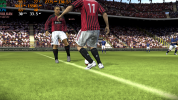
UCL07 runs great, upscaled to 1440p it looks straight out of the marketing material from EA!
619030514-408b1eb0-dc86-4736-989f-622c992d8e8a.png

619030516-e3d543e3-c0c2-4d36-976f-ba34994be083.png

619030513-7b05e95c-9063-4125-8558-cd6bbd5b9b22.png

619030519-c0ef9038-1226-4115-b6bd-e7c7ffb1df17.png

619030517-99fff582-6626-4b99-a8e2-ccb5e65aa07c.png

619030518-a3b0d840-9ed5-451a-959d-76c218b20356.png

619031488-793d3778-c3a1-4e48-bead-013959865e32.png

619031491-929181f0-517a-4b7f-922c-bd63d7d9899a.png

619031490-caed4c83-ce2c-4f04-95db-1cbd77cc45b3.png

619031500-bb383619-39e4-4bad-8897-b03a2c86a72b.png

619031502-db2295eb-9c35-4006-85ec-9129cdf42d2a.png

619031498-95896312-5f61-4738-9894-6e90c7a4640e.png

619031503-f29ba57c-425f-407b-b158-93be14fae9fb.png

619031486-40895606-b412-4829-b699-8f260e39b82a.png

619031505-2e1c948f-c0c0-4fbc-b158-d7560ae9f60c.png

619031497-f5a32158-a5d0-4145-b377-ec04705f806e.png

619031495-b8066ec0-9172-4f84-9e66-3353c5a25be9.png

619031504-e8f973b1-a8b6-48c9-b88a-ef9f656a8b45.png

619031487-5233f494-0c9f-42e9-9baa-cf96fab2f737.png

619031489-99cdcc97-837d-4e39-9b60-f0a0b5818fe8.png

619031494-6b7fe0a7-3757-4db8-b98c-ddbb1d820284.png

619031492-43e3f56c-51de-4664-a32c-345b4e15526c.png

619031493-cd5cc9ef-f162-4879-9616-26163515d1bb.png

619031506-3ca03c4c-cea4-45bc-97fc-b98920bbe342.png

619031499-ba1d6a95-2fbf-4f37-a940-e506dc82208e.png

619031496-325c48bc-979e-49aa-895f-0d5113dcb403.png

619031485-c094e354-d3af-4c13-94f0-d137f78d3810.png

619031501-b61e99e0-df8b-4f49-8685-d54a3842a7ba.png
 
Last edited:
View attachment 430973

It's just one win after another! Missing crowds at 4k has been fixed for 2006 WC even on d3d12 renderer. The framerate is significantly better on d3d12.
2006 FIFA WC is now on near perfect emulation. Only some mild issues remains- like the double commentary playback from time to time and some slight visual glitches here and there.

Setting anisotropic filtering to 16x also makes he 3d grass visible during gameplay camera, although it looks very shimmery. But then again, the grass looked shimmery even on real xbox 360 hardware. The visuals look really great at 4k.
finally this game is looking amazing, can you guys give me a link to this xenia version u are using? I'm still on a build from late 2025
 
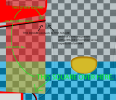
The way textures are mapped on the 2010 World Cup kits doesn’t make any sense.
I’ve spent two days trying to figure out how the area around the armpits works, and… It just doesn’t.
I found how to connect lines through it though, I just happened to lose 30 to 35 QI points in the process.
 
Nope, it's just the template that's a beautiful abomination.

I mean, it can be done:
Screenshot 2026-07-10 104415.png

It just doesn't make sense that the line has to be split like this:
Screenshot 2026-07-10 105829.png

(yes, in the short sleeve template the "sleeve colours" are inverted so I know whether I'm seeing the long sleeve texture or the short sleeve one):
2010 World Cup jersey template copia.png
 
Last edited:
They didn't bother with correct alignment because they likely just draw the textures over the 3d modeling software they used. So correct uv mapping wasn't much of an issue for them.
 
One downgrade I'd like to mod and fix on x360 version of wc 06 is how it only allows you to play the final match scenario on night match time only. You cannot select dusk/day time for the final match. On old gen versions you can select day and dusk too.

And the camera is too twitchy on next gen version, on old then there is a split second delay when you pass or shoot the ball and it allows for smoother camera movement.
 
Hi everyone.
The recent positive feedback about X360 emulation of old FIFA titles led to me to try the latest Xenia Edge release (as of July 2026) and test it.
However, the first big snag is: how to execute these games on Edge?
Setting the graphic backend as "d3d12" returns an error "Unable to initialize Direct3D 12 graphics subsystem" and the game doesn't start, forcing the app closure. On the other hand, if I set vulkan as renderer the game starts but I can only see a black screen and hearing just the game audio.
For context, I have a laptop equipped with a discrete GPU (RX 6600M - 8GB VRAM) and an integrated GPU (Radeon 680M). I installed the latest AMD drivers and even set to force xenia Edge to use the discrete GPU, but to no avail.

How did you guys set Xenia Edge to run those games? What am I missing?

Thanks in advance for the support.
 
Xenia Edge as far as I know doesn’t offer D3D12 support out of the box, but it should offer you the chance to download the additional D3D12 compatibility files when you launch a game in “D3D12 mode” for the first time.
At least, this is what happened to me!
 
Xenia Edge as far as I know doesn’t offer D3D12 support out of the box, but it should offer you the chance to download the additional D3D12 compatibility files when you launch a game in “D3D12 mode” for the first time.
At least, this is what happened to me!
Thank you for the reply.
Unfortunately, when I try to run the game with d3d12 renderer the application returns the error I reported above and it doesn't point me to any d3d12 compatibility files to download.
Which files do you have in your xenia edge folder? Or did the app require to download any specific Microsoft Redistributable files?
 
Xenia Edge as far as I know doesn’t offer D3D12 support out of the box, but it should offer you the chance to download the additional D3D12 compatibility files when you launch a game in “D3D12 mode” for the first time.
At least, this is what happened to me!
hmm that's weird, it doesn't download any additional files for me. The game just boots up with d3d12 renderer.

Hi everyone.
The recent positive feedback about X360 emulation of old FIFA titles led to me to try the latest Xenia Edge release (as of July 2026) and test it.
However, the first big snag is: how to execute these games on Edge?
Setting the graphic backend as "d3d12" returns an error "Unable to initialize Direct3D 12 graphics subsystem" and the game doesn't start, forcing the app closure. On the other hand, if I set vulkan as renderer the game starts but I can only see a black screen and hearing just the game audio.
For context, I have a laptop equipped with a discrete GPU (RX 6600M - 8GB VRAM) and an integrated GPU (Radeon 680M). I installed the latest AMD drivers and even set to force xenia Edge to use the discrete GPU, but to no avail.

How did you guys set Xenia Edge to run those games? What am I missing?

Thanks in advance for the support.

Dunno what can cause the issue. I think your best bet would be open a new issue on Xenia Edge's githube page and mentioning the errors you are getting.
Xenia edge github link: https://github.com/has207/xenia-edge/issues

RX 6600M seems to be supporting all the dx12 features. So see if Xenia is accidentally using your integrated GPU instead of your discrete GPU. For laptops there are are options in windows to force an app to use dGPU, idk how to do it exactly. You should be able to google it and find some info on how to do it.

Being that said, Radeon 680M is RDNA2 based. So Idk if even that GPU is supposed to face issue with dx12. However, after googling for a while, I did see some reports of this igpu not being able to handle API Level 12_2. So this might be the culprit.
 
Which files do you have in your xenia edge folder? Or did the app require to download any specific Microsoft Redistributable files?
I downloaded a package that only had the Xenia edge executable and the licence file (from github). I created a folder for it and manually copied the two files (the executable and the licence file which is just a text file) then started the emulator and added the game.
Then, upon adding the 2010 World Cup game’s “default.xex” file, it prompted me to download the missing d3d12 files.
It was done 100% by the emulator, within the emulator. No need to manually go hunting for redistributions. It downloaded the additional content then created a folder (within the main Xenia Edge directory) with some DLL files (not many, like two or three if I recall correctly).
Can’t name them because I’m away this week, but I’ll screenshot them once I get back if I remember (next weekend, more or less).
 
FIFA 07 crash can be avoided by following the github guide. It works really well even though it's kinda cumbersome to execute.

When you are on the stadium/difficulty/match time menu after picking a team and select sides, open task manager and go to details tab. Find Xenia.exe and right click on it and select "set affinity". And then uncheck all the CPUs and then check CPU 0 and 1 and press ok.

Now the game will slow down significantly but you can press A to proceed forward and wait till the loading is complete. You will know the loading is finished when the text goes from "loading" to "press start". Once that happens, you can go back to task manager and set the affinity back to all CPUs so that the game speed normalizes. Go back to emulator and press start and the game will no longer crash.

Tested with multiple stadiums on day/dusk/night times. Seems to be working very well. Hopefully someone manages to figure out a way to fix it by default so that this is no longer required. But yeah, the game is playable. I will still label it as "playable with workarounds" instead of just labelling it as playable as it still requires some unconventional steps.

But GGs. I think, 2026 has been the best year for X360 FIFA emulation. PS3 FIFA games were fairly working decently except select few. But we finally get to play the x360 FIFA games on pc.

Preview:

(Managed to play on night match using this method. Previously night matches were guaranteed crash and sometimes dusk matches would start)


Last edited:
View attachment 430814


WC 06 crowds fixed on 4k on vulkan too, unfortunately, my GPU can't handle the game with vulkan. The framerate just struggles. Probably 5090 users can handle it.


View attachment 430839


FIFA 08 crowds fixed too. Have to set render_target_path = accuracy on this game too. This option is not required on WC 06 for the crowds.

Further findings: For FIFA 08, both d3d12 and vulkan works with crowds. For UCL 06-07 and FIFA WC 06 you have to use vulkan renderer. FIFA WC 06 suffers the most because vulkan renderer in that game and RTWC 06 causes the framerate to dip significantly.

UCL 06-07 crashes about 50% of the time on vulkan for me when loading into a match (the crowds work tho), is this the same for you? using all the same settings that you posted
 
UCL 06-07 crashes about 50% of the time on vulkan for me when loading into a match (the crowds work tho), is this the same for you? using all the same settings that you posted

Yeah, UCL crashes randomly here too. At first I thought it was linked to particular stadiums like FIFA 07 but it's so random I can't even tell anymore.

I haven't tried to FIFA 07 workaround yet. Have to see if setting the CPU affinity to 1 and 0 at the starting line up menu works or not.
 
Yeah, UCL crashes randomly here too. At first I thought it was linked to particular stadiums like FIFA 07 but it's so random I can't even tell anymore.

I haven't tried to FIFA 07 workaround yet. Have to see if setting the CPU affinity to 1 and 0 at the starting line up menu works or not.
didn't you say you tried it in the last post? or is this about trying it with vulkan?
either way i tried it yesterday, played a couple matches on fifa 07, worked flawlessly with that cpu trick (on d3d12 tho)
 
didn't you say you tried it in the last post? or is this about trying it with vulkan?
either way i tried it yesterday, played a couple matches on fifa 07, worked flawlessly with that cpu trick (on d3d12 tho)
I meant to say that I haven't tried to FIFA 07 workaround on UCL 06-07 and that it might work in that game too.
 
well it wasn't needed on d3d12, UCL only crashes on vulkan

I tested it and so far, UCL does crash for me on match startup on some stadiums. However, I did try the fifa 07 workaround on those stadiums now and managed to start matches without crashing.

UCL 06-07 seems to drop the framerate during some closeup cutscenes, my GPU usages goes 99% and fps drops to 20s. Looks like this game is demanding on cutscenes.
 
Back
Top Bottom