FiFA [2006-2011] Next gen ports via RPCS3 and Xenia

well it wasn't needed on d3d12, UCL only crashes on vulkan
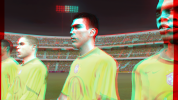
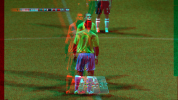
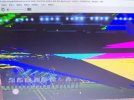
When playing UEFA Champions League 06-07 on Xenia Edge, the game will crash before match loading whether I use D3D12 or Vulkan, unless I cut down the number of CPU cores allocated.Moreover, the July 12 build of Xenia Edge prompts users to download three DLL files when rendering with D3D12. After finishing the download, the screen is completely torn upon entering matches, making the game unplayable. I’ve tested all older FIFA titles and they all have this same issue.

By contrast, with Vulkan, everything works perfectly as long as you set the rendering mode to Precise and enable 2x resolution scaling, and crowd textures render properly too. I’ve tested multiple titles including 2006 FIFA World Cup, FIFA World Cup: Road to Germany 2006, UEFA Champions League 06-07, Euro 2008, 2010 FIFA World Cup and 2014 FIFA World Cup. All of these run smoothly without complicated tweaks. It’s clear the developer’s future development focus will lean heavily toward the Vulkan renderer.
 
They need to improve the performance of vulkan renderer then. Because the performance is really poor compared to d3d12.
 
I've installed a fresh copy of Xenia edge and it indeed downloads dlls for d3d12. So far, no visual issues on the games I've tested with d3d12.

Tested specs:

RTX 5070 Ti
i7 6700k
 
I've installed a fresh copy of Xenia edge and it indeed downloads dlls for d3d12.
Thanks for confirming it. For a moment I thought I was going crazy and that I was seeing things in my mind. 🤣
@babbu this could help you too! Please try downloading the latest Xenia Edge version and run it: it should download the required D3D12 files by itself!
 
I've installed a fresh copy of Xenia edge and it indeed downloads dlls for d3d12. So far, no visual issues on the games I've tested with d3d12.

Tested specs:

RTX 5070 Ti
i7 6700k
Do games run normally for you with D3D12 renderer without complicated configuration? Everything works perfectly for me with just basic tweaks on Vulkan.
 
I've installed a fresh copy of Xenia edge and it indeed downloads dlls for d3d12. So far, no visual issues on the games I've tested with d3d12.

Tested specs:

RTX 5070 Ti
i7 6700k
It prompts to download three DLL files. Are they saved to the software's default directory after downloading? Could you share a screenshot of your Xenia Edge installation folder?
 
Do games run normally for you with D3D12 renderer without complicated configuration? Everything works perfectly for me with just basic tweaks on Vulkan.
What complicated configuration? There are like only 2-3 additional settings involved to further optimize the visuals and fix some issues.
These settings are required for both Vulkan and D3D12 renderer.

The basic tweak is to set rendering to "accuracy" instead of "performance" on emulator settings. This sets all the accuracy settings to max which causes a huge burden on CPU and GPU. You may be able to bruteforce it on newer and better CPUs but for majority of the users, this is detrimental. Not to mention, even on higher end pcs, you might be able to render the games in even higher resolution without performance loss if you use manual config overrides.

Explanation of some of the config overrides I use and why I set it in particular ways:
anisotropic_override = 0 or 5
0 would make the games use trilinear filtering. This is useful for FIFA 08 onwards where the pitch texture turns into a grainy mess with repeated noticeable patterns with 16x AF/ especially while running the game at higher resolutions. This affects both ps3 and xbox 360 versions. On ps3 port, the best you can do is 2x AF to mitigate it somewhat and even then the bottom 1/4th of the grass suffers from the aforementioned issues. With the value set to 0 on Xenia, you make the grass look just like it does on native hardware- although you do loose on the 16x AF quality improvement.​
5 would set AF to 16x. This is useful for FIFA 06 rtwc to UCL 06-07 where the improved anisotropic filtering does not cause over grain/ repeated patterns. So it's a net improvement. A bit exception to this is WC 06 where 16x AF does look beautiful and it even increases the draw distance of 3D grass and makes it visible even on gameplay camera. But it also results in more shimmering than the already present shimmering on grass during gameplay.​

half_pixel_offset = true
This fixes the post process effects to scale correctly on higher resolutions. Otherwise you will see artifacts with postfx effects like bloom and DOF- especially on RTWC 06 and WC 06.​

readback_resolve = none/ fast/ strict
Strict is the biggest framerate killer. It will absolutely crush your framerate and raise the demand on both GPU and especially your CPU. If your CPU, especially it's single core performance is not up to mark, the games will slow down significantly. Unfortunately, this is required in the later FIFA games like 2014 FIFA World Cup where the pitch will remain completely black and jerseys will have wrong textures otherwise. There's workaround to change it back to "none" after a match starts to improve the performance.​
occlusion_query = none/ fast-alt
Setting it to "Strict" will again, drop the performance significantly. Instead setting it to "fast-alt" can get similar results without huge performance loss. Required in some of the FIFA games like RTWC 06-08 to prevent stadium lights bleeding through.​
occlusion_query_saturation = 1/ 0.75
Lower values can help with the occlusion intensity of stadium lights on RTWC 06-WC 06.​
render_target_path = accuracy
Required in FIFA 07-08 to fix the missing crowds when running in 4k.​
Among the above settings, only render_target_path, occlusion_query, readback_resolve and half_pixel_offset are must required settings and not all of them are needed in every FIFA game. Manually setting these without putting the whole general rendering setting to "accuracy" saves up on a lot of performance- on both vulkan and d3d12.

 
It prompts to download three DLL files. Are they saved to the software's default directory after downloading? Could you share a screenshot of your Xenia Edge installation folder?

A new folder named "D3D12" is created on the directory where you have extracted Xenia Edge. In that folder, the following .dll files are being downloaded:

D3D12Core.dll
dxcompiler.dll
dxil.dll
 
Dear friends,

First of all, thank you very much for all your hard work. I’m really enjoying reliving my childhood with these games (I was born in 1993).

Unfortunately, I’ve run into an issue that I just can’t figure out.

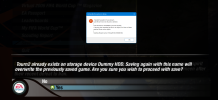
I’m unable to save my progress in Tournament mode. When the game displays the following message:

"Tourn2 already exists on storage device DummyHDD. Saving again with this name will overwrite the previously saved game. Are you sure you wish to proceed with save?"
and I select "Yes", FIFA World Cup 2006 immediately crashes and shows the attached error message (see screenshot).

Has anyone experienced this issue before or knows what I might be doing wrong?

Thank you in advance for your help!
 

Attachments

  • Screenshot 2026-07-15 191338.png
    Screenshot 2026-07-15 191338.png
    1.9 MB · Views: 0
access denied? Is it some admin perm problem?
Hi Sami, yes :) I was able to resolve it, thank you

Now I am just struggling with FIFA World Cup 2010 game because it only runs with 60 FPS and I do not why. Are you using the same Xenia Edge Version for all games such as UCL06/07, FIFA World Cup 2006, FIFA08?
 
Hi Sami, yes :) I was able to resolve it, thank you
Now I am just struggling with FIFA World Cup 2010 game because it only runs with 60 FPS and I do not why. Are you using the same Xenia Edge Version for all games such as UCL06/07, FIFA World Cup 2006, FIFA08?
Yes, I'm using the same version of Xenia edge for all of the x360 games so far.

FIFA RTFWC 06-WC 06 is definitely hard capped to 60 FPS. I haven't tested 07-09 with uncapped framerate. However FIFA 10 and WC 10 did reach 70-90 FPS for me during gameplay when FPS was set to uncapped. However, the cutscenes are capped to 33 FPS unfortunately.

1784303170144.png

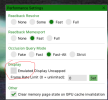
Right click to open the settings menu in game and then check this option and set FPS limit to 0, that way the framerate should be uncapped in WC 2010.
 
Back
Top Bottom