Exact same problem here, and it happend with 6.0.0 and previous versions of ShortFuse's DLSS, as well.Hi All, I'm using the shortfuse DLSS5 add on, and it works for 1 launch, where I give the following settings, and then prevents the game from launching for the next launches. The game gets to the windowed black splash screen where reshade loads, and then the window never goes full screen and the actual intro animations never load, and in fact the screen is completely frozen. I've tried switching off NR in the first 2s, which then allows me get in and out of reshade, but this doesn't solve the problem to allow me to launch the game and then reenable. Any ideas?
View attachment 452162


Navigation
Install the app
How to install the app on iOS
Follow along with the video below to see how to install our site as a web app on your home screen.
Note: This feature may not be available in some browsers.
More options
Style variation
You are using an out of date browser. It may not display this or other websites correctly.
You should upgrade or use an alternative browser.
You should upgrade or use an alternative browser.
eFootball (All Platforms)
- Thread starter PRO_TOO
- Start date

Sovereign Hope
Premier League
- 8 August 2017
Having fun with master league thanks to brilliant modders here plus moded gameplay that i made. Ball physics feel similar to pes2021. More punchy and less floaty. First touch is much more heavier making defenders and gk very vulnerable.
Superstar difficulty, game speed 0. 12 minutes
Superstar difficulty, game speed 0. 12 minutes
Last edited:

Lucky youSince the 6.1 update, my game crashes every time ive try starting a game. No reboot, no error, just closing.
Last edited:
Bing Bing Wahoo
League 2
- 11 April 2024

Bogo36
Premier League
- 3 March 2013
Please DLSS and Frame Gen, but i expect nothing 😅
Having fun with master league thanks to brilliant modders here plus moded gameplay that i made. Ball physics feel similar to pes2021. More punchy and less floaty. First touch is much more heavier making defenders and gk very vulnerable.
Superstar difficulty, game speed 0. 12 minutes
Not your fault, but graphics and shading suck. Also ball movement is like rockets in between feet. Zero organic feel
Bogo36
Premier League
- 3 March 2013
For anyone who wants DLSS 5 and Frame Generation for this game:
https://github.com/ghostinthecamera/GITC-Uplift
This is the best DLSS 5 tool out there. Works perfectly fine with Motion Vectors. I strongly recommend Launchpad.
https://github.com/Capt-Hunter/HSF
And this new Tool is like native Framegen. Its so good, its even better than Smooth Motion. It also uses Motion Vectors and i also recommend Launchpad.
You have to set the depth of the game yourself with reshade. You can do this with the Displaydepth.fx effect. Im playing like this and its so damn good.
This is my depth configuration if you dont want to do it yourself:
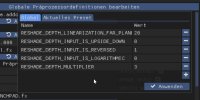
You have to add missing lines by yourself.
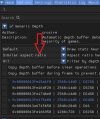
And make sure to make this change in the addons tab so the game will use the correct depth:
https://github.com/ghostinthecamera/GITC-Uplift
This is the best DLSS 5 tool out there. Works perfectly fine with Motion Vectors. I strongly recommend Launchpad.
https://github.com/Capt-Hunter/HSF
And this new Tool is like native Framegen. Its so good, its even better than Smooth Motion. It also uses Motion Vectors and i also recommend Launchpad.
You have to set the depth of the game yourself with reshade. You can do this with the Displaydepth.fx effect. Im playing like this and its so damn good.
This is my depth configuration if you dont want to do it yourself:
You have to add missing lines by yourself.
And make sure to make this change in the addons tab so the game will use the correct depth:
Sovereign Hope
Premier League
- 8 August 2017
I've insert pes21's ball.o values into efootball for organic ball physics. Exhibition 12 min match Superstar difficultyNot your fault, but graphics and shading suck. Also ball movement is like rockets in between feet. Zero organic feel