༺Ƥeຮ༻
Championship
- 13 July 2020
PES 2021 Private Server / Online Emulator Progress + TrueNAS Docker Setup
Hi everyone,
I want to share the current progress of our PES 2021 private server / online emulator work, explain what has already been achieved, what is still not working, and how other people can run the current test server using TrueNAS + Docker.
First of all, credit where it is due:
Original project by Nikow5:
Nikow5/Pes2021PrivateServer
Our work is based on that project. Nikow5’s project gave the starting foundation for PES 2021 private server research and local/LAN-style testing.
What we are doing now is extending and heavily improving that base into a Dockerized, dashboard-driven, publicly deployable emulator environment for further reverse engineering and eventually online lobby / friendly match support.
This is not a finished public server yet. It is a working reverse engineering and protocol research build.
What this project is trying to achieve
The long-term goal is to restore usable online functionality for PES 2021.
Priority order:
- Friendly Match Lobby
- Normal 1 vs 1
- Room creation
- Room joining
- P2P negotiation
- Gameplay packet handling
- Team Play Lobby
- MyClub
MyClub is not the priority right now because it has many additional services and is much more complex. Friendly Lobby / normal 1 vs 1 is a better first target.
What was added on top of the original Nikow5 project
The original project was the base.
On top of it, we added or significantly improved:
✅ Docker deployment
✅ Public Docker image
✅ TrueNAS SCALE deployment
✅ Docker Compose / YAML setup
✅ Runtime environment configuration
✅ Web dashboard
✅ Live packet monitor
✅ Packet inspector
✅ HEX viewer
✅ ASCII viewer
✅ Timeline view
✅ Session tracking
✅ Export Debug ZIP
✅ Individual packet
.hex export✅ Auth analysis reports
✅ RX/TX packet comparison
✅ Byte-by-byte Auth diff
✅ Network discovery after Auth
✅ UDP/STUN/raw UDP logger
✅ HTTP/Gateway logger
✅ Runtime Auth mode switching
✅ Auth Lab profiles
✅ Clear Logs button
✅ Version display inside dashboard/API/logs
✅ Debug export suitable for sharing captures with other developers
The Docker image currently used is:
Code:
noobsaibot301/pes2021-emulator:latestVersioning is intentionally kept inside the dashboard, API, logs, and export files.
We do not rely on versioned Docker tags anymore.
Current technical status
The emulator now reaches far beyond simply listening on TCP.
The current working flow is:
Code:
New TCP connection
        ↓
RX 0x2EE4
EULA / Server Area Request
        ↓
TX 0x2EF4
EULA / Server Area Response
        ↓
RX 0x2E04
Authentication Ticket
        ↓
Authenticated User: TestUser
        ↓
TX 0x2E04
Authentication Response
        ↓
Client closes connection
This means:
✅ DNS redirect works
✅ The PES 2021 client reaches our server
✅ TCP ConnectGate works
✅ XOR / NclMio parser works
✅ Packet parser works
✅ We correctly detect PES commands
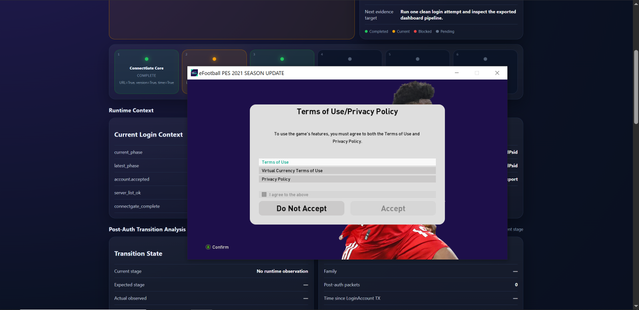
✅ EULA request is intercepted
✅ EULA response is accepted by the client
✅ Auth ticket is intercepted
✅ Auth response is accepted far enough for the client to continue through Auth
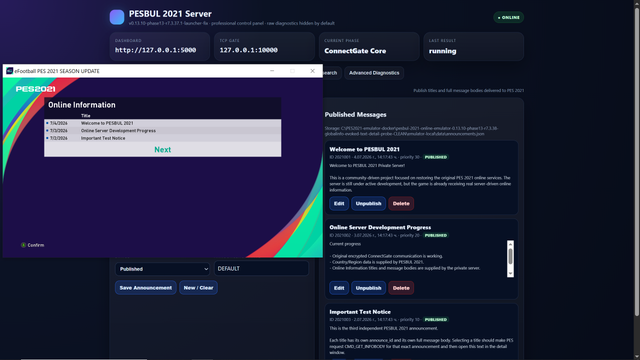
✅ The game reaches the Online menu / login flow
❌ The client does not yet send the first Lobby packet
❌ The client closes immediately after Auth
This is a very important milestone. The project is no longer stuck at connection, DNS, TCP, XOR, or EULA. The blocker is now specifically the post-authentication transition before the Lobby protocol begins.
Confirmed opcodes so far
Code:
0x2EE4 = EULA / Server Area Request
0x2EF4 = EULA / Server Area Response
0x2E04 = Authentication Ticket / Authentication Response
The current known sequence is stable and repeatable.
What we tested
A lot of Auth Response variants were tested.
Auth Lab profiles include:
Code:
baseline
mirror8
mirror16
mirror32
mirror64
mirror96
full120
mirror_header
user_profile
pure_mirror96
pure_full120
echo_payload120
The reason for testing these profiles was to determine whether the immediate disconnect after Auth was caused by:
- wrong packet length
- wrong payload size
- missing mirrored token
- wrong session bytes
- wrong IP field
- wrong flags
- zeroed tail
- overwritten fields
- bad header/payload layout
Current result:
All tested profiles reach the same general state:
Code:
EULA accepted
Auth accepted
POST_AUTH_WAIT
Client closes
No Lobby opcode
So the problem is probably not just packet length or simple mirroring.
What is currently NOT working
The emulator does not yet reach:
❌ Friendly Lobby
❌ Room list
❌ Room creation
❌ Room join
❌ P2P negotiation
❌ Gameplay packets
❌ Team Play
The client closes the TCP session around 50 ms after the Auth Response.
No additional endpoint is seen after Auth:
Code:
No additional TCP connection
No HTTP request
No UDP packet
No TLS request
No STUN packet
No Lobby opcode
This suggests the remaining blocker is likely inside Auth/session validation, or possibly Steam-related validation.
Current theory
The remaining issue is probably one of:
- missing Auth Response field
- unknown session token
- encrypted/signature field
- checksum/HMAC-like validation
- Steam ticket/session validation
- some internal client-side validation before Lobby starts
The Steam version may require a valid Steam/Konami ticket flow before it sends the first Lobby opcode.
One planned experiment is to test Football Life 26, because it does not require Steam. If Football Life progresses further, that would strongly suggest the blocker is related to Steam authentication/session validation.
TrueNAS / Docker Setup Tutorial
This is the current simple setup method.
You only need:
- TrueNAS SCALE
- Docker / Custom App support
- The Docker image:
Code:noobsaibot301/pes2021-emulator:latest - Your server LAN IP
- PES client DNS/hosts redirect pointing PES domains to your server
Do not publish your real LAN IP or public IP when sharing logs.
Use placeholders like:
Code:
<YOUR_TRUENAS_IP>
<YOUR_CLIENT_IP>
<YOUR_SERVER_IP>
Docker Compose / TrueNAS YAML
Use this as the base YAML:
Code:
services:
  pes2021:
    container_name: pes2021
    image: noobsaibot301/pes2021-emulator:latest
    pull_policy: always
    restart: unless-stopped

    environment:
      PES_DB_PATH: /tmp/pes2021.db
      PES_EVENT_LOG: /tmp/events.log
      PES_GATEWAY_TCP_PORTS: '80'
      PES_HTTP_PORT: '5000'
      PES_REGION_CODE: FRA
      PES_SERVER_PUBLIC_IP: <YOUR_TRUENAS_IP>
      PES_TCP_PORT: '10000'
      PES_UDP_PORTS: '5730,5739,5740'

    ports:
      - "5000:5000/tcp"
      - "8088:80/tcp"
      - "10000:10000/tcp"
      - "5730:5730/udp"
      - "5739:5739/udp"
      - "5740:5740/udp"
Replace:
Code:
<YOUR_TRUENAS_IP>with the LAN IP of your TrueNAS server.
Do not post your real IP publicly.
What the ports are used for
Code:
Host Port | Container Port | Protocol | Purpose
5000      | 5000           | TCP      | Dashboard / API
8088      | 80             | TCP      | HTTP/Gateway logger
10000     | 10000          | TCP      | PES TCP ConnectGate
5730      | 5730           | UDP      | STUN/raw UDP logger
5739      | 5739           | UDP      | PES UDP/P2P candidate logger
5740      | 5740           | UDP      | PES UDP/P2P candidate logger
Dashboard URL:
Code:
http://<YOUR_TRUENAS_IP>:5000TrueNAS setup steps
- Open TrueNAS SCALE.
- Create a Custom App / Docker Compose app.
- Paste the YAML above.
- Replace
<YOUR_TRUENAS_IP>with your TrueNAS LAN IP. - Save / Deploy.
- Wait for the container to start.
- Open:
Code:
http://<YOUR_TRUENAS_IP>:5000You should see the emulator dashboard.
Expected startup logs
The logs should show something like:
Code:
TCP Server (ConnectGate) listening on 0.0.0.0:10000
Mode: NclMio (XOR)
STUN/raw UDP logger listening on 0.0.0.0:5730
STUN/raw UDP logger listening on 0.0.0.0:5739
STUN/raw UDP logger listening on 0.0.0.0:5740
Raw TCP/HTTP/TLS hit logger listening on 0.0.0.0:80
Windows connectivity tests
From the Windows PC running PES 2021:
Code:
Test-NetConnection <YOUR_TRUENAS_IP> -Port 5000
Test-NetConnection <YOUR_TRUENAS_IP> -Port 10000
Test-NetConnection <YOUR_TRUENAS_IP> -Port 8088
UDP quick test:
Code:
$udp = New-Object System.Net.Sockets.UdpClient
$bytes = [Text.Encoding]::ASCII.GetBytes("pes udp test")
$udp.Send($bytes, $bytes.Length, "<YOUR_TRUENAS_IP>", 5739)
$udp.Close()
Then check the dashboard logs.
PES DNS / hosts redirect
The PES client must be redirected to your emulator.
Depending on your setup, this can be done with:
- Windows hosts file
- local DNS override
- router DNS override
- Pi-hole / AdGuard DNS rewrite
- custom DNS server
Example format:
Code:
<YOUR_TRUENAS_IP> pes21-x64-gate.cs.konami.net
<YOUR_TRUENAS_IP> pes21-x64-stun.cs.konami.net
The exact domains may need to be confirmed by packet capture or previous PES network research.
Testing workflow
Recommended workflow:
- Open dashboard:
Code:http://<YOUR_TRUENAS_IP>:5000
- Click Clear Logs.
- Start PES 2021.
- Enter Online mode / Friendly Match Lobby attempt.
- Watch dashboard timeline.
- Expected current result:
Code:
   RX 0x2EE4
   TX 0x2EF4
   RX 0x2E04
   TX 0x2E04
   POST_AUTH_WAIT
POST_AUTH_CLOSE- Click Export Debug ZIP.
- Share the ZIP with other developers for analysis.
Before sharing, make sure no personal IPs are exposed.
Replace LAN/private IPs with:
Code:
<YOUR_TRUENAS_IP>
<YOUR_CLIENT_IP>
Version / Development History
v0.4
Fixed Docker startup problems.
Added:
- PYTHONPATH fix
- DB init fix
- entrypoint improvements
- Docker healthcheck
- TrueNAS Custom App YAML
Purpose:
Make the project start reliably in Docker/TrueNAS.
v0.5
Added:
- startup banner
- dashboard URL in logs
- improved dashboard
/healthendpoint- expanded status API
- TrueNAS YAML using
latest
Purpose:
Make the container easier to run and monitor.
v0.7
Added:
- live packet monitor
- selected packet HEX viewer
/api/admin/packets- RX/TX counters
- gateway hit counters
- TCP events written into dashboard logs
Purpose:
Move from simple logging to live packet inspection.
v0.8
Added:
- dashboard title/version
- live refresh
- packet monitor
- clickable packets
- HEX + ASCII inspector
- protocol timeline
/api/admin/timeline- structured packet fields
- better stats
Purpose:
Make captured traffic readable in real time.
v0.8.1
Added:
- Export Debug ZIP
/api/admin/export.zip- per-packet
.hex - packet JSON/TXT/CSV
- timeline export
- sessions export
- stats export
- knowledge base export
Purpose:
Make it easy to share packet captures for reverse engineering.
v0.9
Added:
- Clear Logs
- named debug exports
- post-auth analysis
- POST_AUTH_WAIT / POST_AUTH_RX / POST_AUTH_CLOSE
- larger TCP/TLS/HTTP preview
- UDP/STUN HEX logging
Purpose:
Find out what happens immediately after Auth.
Discovery:
The client closes after Auth and does not send a Lobby opcode.
v0.9.1
Added:
- Auth Investigation panel
/api/admin/auth-report- Auth report JSON/TXT exports
- per-session Auth reports
- RX
0x2E04vs TX0x2E04byte diff - parsed auth helper fields
AUTH_FIELDSlogging
Purpose:
Understand why the client closes immediately after Auth.
v0.9.2
Added:
- cleaner debug export
auth_offsets.jsonauth_diff.txtconnection_state.jsonpacket_summary.md- full auth offset tables
Purpose:
Create better captures before Lobby-focused work.
v0.9.3
Added:
PES_AUTH_RESPONSE_MODEPES_AUTH_RESPONSE_PAYLOAD_LEN- Auth modes:
- baseline
- mirror8
- mirror16
- mirror32
- mirror_header
- user_profile AUTH_VARIANTloggingPOST_AUTH_CLOSEnow logs active Auth mode
Purpose:
Test whether missing token/session mirroring causes the post-auth close.
v0.9.4
Added:
- Network Discovery Lab
/api/admin/network-discoverynetwork_discovery.jsonnetwork_discovery.txt- correlation window after Auth
- DISCOVERY_TCP / DISCOVERY_UDP tags
- HTTP host/path / TLS SNI extraction attempt
- external endpoint hits after auth stat
Purpose:
Check whether the game opens another TCP/UDP/HTTP/TLS endpoint after Auth.
Result:
No external endpoint detected.
v0.9.5
Added:
- default auth profile changed to
full120 - TX
0x2E04total length changed to 120 bytes - added:
- mirror64
- mirror96
- full120 - success/status bytes preserved after mirroring
- IP candidate preserved after mirroring
- auth profile test plan export
Purpose:
Test whether the full 120-byte Auth Response is required.
Result:
Still closes after Auth.
v0.9.5.1
Hotfix.
Fixed:
/api/admin/export.zipHTTP 500- safe export writers
export_warnings.json
Purpose:
Make debug export reliable again.
v0.9.6
Added:
- dashboard Auth Mode dropdown
GET/POST /api/admin/auth-mode- runtime Auth Mode switching
- TCP server reads active mode from
/tmp/pes_auth_response_mode.txt - no Docker rebuild needed for Auth profile tests
Purpose:
Make Auth profile testing fast.
Before this, changing Auth mode required YAML changes / redeploy.
After this, testing is:
Code:
Select Auth Mode
↓
Clear Logs
↓
Test PES
↓
Export ZIP
v0.9.7
Added:
- pure auth profiles:
- pure_mirror96
- pure_full120
- echo_payload120 - reference prep exports
- reference-comparison guidance
Purpose:
Test whether overwritten flags/IP fields caused the disconnect.
Result:
Still no Lobby packet captured.
Current conclusion
We have a working PES 2021 connection, EULA, and Auth pipeline.
The blocker is now narrow:
Code:
Auth Response accepted
↓
Client performs some validation
↓
Client closes before Lobby
The next real breakthrough will likely come from:
- Testing Football Life 26
- Capturing a real successful reference session
- Reverse engineering the remaining Auth/session fields
- Comparing original vs emulator Auth Response byte-by-byte
Request for help
If anyone has experience with PES 2021 networking, Konami's ConnectGate/NclMio protocol, Steam ticket validation, or has old packet captures from working PES 2021 online services, any help would be extremely valuable.
The project already has:
✅ working Docker deployment
✅ working dashboard
✅ working packet capture
✅ working EULA
✅ working Auth
✅ reproducible debug exports
The missing piece is the final validation step between Auth and Lobby.
Last edited:

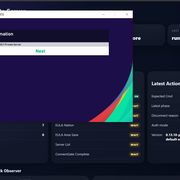
 Maybe I take/waste too much time on it, because just to CLICK > OPEN the message, I'm reversing and extracting-decoding data the whole day