FiFA [2006-2011] Next gen ports via RPCS3 and Xenia

View attachment 439781

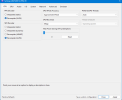
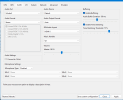
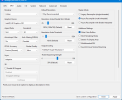
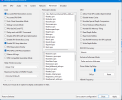
You have to set Readback Resolve = All, and Enable "Synchronous copies (stall GPUS)".

Otherwise the grass and kits will completely bug out. However, enabling these settings puts the PC to a crawl. Even on my 9800 x3d, I could not maintain locked 60 fps with these settings at 4k.

RPCS3 runs better technically but looks like ass thanks to the visual bugs and the CPU screams in agonizing pain while running the game on rpcs3. So there's that.

That's my experience.
For me runs better without synchronous copies and occlusion query on fast
 
I don't know why you always get different results from others here. Must the the emulator acting different with your hardware configuration.

Throughout the span of 3 different hardwares so far, I couldn't get the jerseys to render correctly unless I set the settings in the way I've shown in the previous comment.

I don't know what to say.

View attachment 439866

For me runs better without synchronous copies and occlusion query on fast
You're right. This emulator has different optimal settings for different hardware configurations, and there are also differences between Android mobile devices and PCs.
 
For me runs better without synchronous copies and occlusion query on fast
One of my devices is equipped with a 13th‑gen Intel i5 CPU and an RTX 3060 graphics card. The other has a 14th‑gen Intel i5 CPU and an RTX 5060 graphics card. Both systems use the DX12 renderer. The PC with the RTX 3060 suffers from texture bugs, full‑screen horizontal artifacts and screen tearing, while the RTX 5060 machine works perfectly with no issues.
 
For me runs better without synchronous copies and occlusion query on fast

You're right. This emulator has different optimal settings for different hardware configurations, and there are also differences between Android mobile devices and PCs.


Disabling synchronous copies (GPU stall) improves performance on all hardwares.

It's just that for FIFA WC 14, if you have these settings disabled, the grass and kits will look wrong. However this will completely destroy the performance.

HOWEVER, there is a workaround. In the main menu, keep those settings as I shown and then start a match. Once the match intro cutscene has started/ finished and you are at kick off, you can disable synchronous copies setting and even set readback resolve from full to fast and this will drastically improve the performance and the kits and pitch wont look corrupted.

However, you have to do this trick before every single match, otherwise the next match will have corrupted graphics again.
 
Hello everybody!
An alpha version of my 2010 FIFA World Cup mod for Xbox 360 has been released. For now you can find it on Soccergaming, I'll create a thread for it also here in the coming days (and I'll try to keep them synced somehow).

Here's the link should you be interested in it:
https://soccergaming.com/forums/threads/2010-fifa-world-cup-enhanced-edition.6476334/
Excellent work.

I'm still trying to figure out how the LOD works in the pre 2011 FIFA games. There seems to be no mention of any LOD values anywhere at all unlike the ps2 and xbox FIFA games which still had LOD values in ini files. The lod values are likely stored on the default.xex then? But inspecting it with hexeditors doesn't really reveal much either.
 
HUD bug is present on Xenia too, it's really annoying while playing tournaments. The game crashes when the HUDs disappear on the 2nd match, especially on WC 10. For regular FIFA 10, you dont crash when the HUDs disappear.
actually it only crashes if a penalty is awarded when hud disappears
otherwise, you can play the match without problems
 
I've managed to fix invisible ball glitch for Rio final ball by copying these decompressed files over the same id
454109D4 - 2026-08-23T14-22-56.png
also make sure to have these lines in your "cl.ini" file from fifa main folder:
Code:
[POW]
ENABLE_ALL_UNLOCKABLES = 1
[]
UNLOCK_ALL_UCC = 1
UCC = 1
UCC_MULTICHARACTER = 1
on the other hand, the only graphic artifacts left for me are those lights getting through every model:
454109D4 - 2026-08-23T13-53-27.png454109D4 - 2026-08-23T13-53-34.png454109D4 - 2026-08-23T13-53-43.png454109D4 - 2026-08-23T13-54-32.png
you guys also have this problem?
 

Attachments

I've managed to fix invisible ball glitch for Rio final ball by copying these decompressed files over the same id
View attachment 441309
also make sure to have these lines in your "cl.ini" file from fifa main folder:
Code:
[POW]
ENABLE_ALL_UNLOCKABLES = 1
[]
UNLOCK_ALL_UCC = 1
UCC = 1
UCC_MULTICHARACTER = 1
on the other hand, the only graphic artifacts left for me are those lights getting through every model:
View attachment 441313View attachment 441314View attachment 441315View attachment 441316
you guys also have this problem?

Yes on xenia the light occlusion is still not working correctly for FIFA WC 2014.
 
To this day, I haven't managed to configure Xenia to match the quality of RPCS3; despite the slowdowns, it's still the best option for this game in my opinion.
 
Current release of Xenia Edge has completely broken the gameplay, animations and physics of FIFA 14 WC [and possibly other later FIFA games], the players get freeze mid animation and the ball moves away somewhere else, rendering the game unplayable. What a shame.

Last working build with no issues are from 17th August 2026.
 
context_promote_vec128 = false

To solve the broken gameplay and animation of FIFA 14 WC on latest builds of xenia edge.
 
context_promote_vec128 = false

To solve the broken gameplay and animation of FIFA 14 WC on latest builds of xenia edge.
This parameter has always been present on the mobile‑side emulator XenDroid, and it functions identically to disabling context‑promotion optimizations on the PC version.
 
We need to find a way to make the cutscenes of fifa 07-14wc 60 fps. Good lord they look like trash at 30 fps whereas wc 06 looked broadcast level smooth.

But even worse is if you uncap the framerate, the game fps goes 100+ and looks really smooth on high refresh rate monitors, but the cutscenes instead render at 34-40 ish fps with a hard limit at 40, and it's not even proper 40 fps- looks more like the camera and animations all move at 30hz and that results in a stuttery mess when the output framerate is 40.

Only way to fix it is by disabling the fps uncap option which locks the scenes back to 30 and while it looks like ass, at least it doesn't have stutters. However, that also means the gameplay framerate gets locked back to 60 and you can no longer enjoy higher framerates.
 
@Sami 1999 do you know how can I change my in game controller buttons from xbox360 to ps3 (wc2010 -xenia)?

Nope. There should be something in the ini files that should allow the game to change the buttons UI [eg: 0/1/2 for generic/xbox/playstation] and usually the games ship with all three button sets anyways. However that's just a theory, I never bothered testing it.
 
I've managed to fix invisible ball glitch for Rio final ball by copying these decompressed files over the same id
View attachment 441309
also make sure to have these lines in your "cl.ini" file from fifa main folder:
Code:
[POW]
ENABLE_ALL_UNLOCKABLES = 1
[]
UNLOCK_ALL_UCC = 1
UCC = 1
UCC_MULTICHARACTER = 1
on the other hand, the only graphic artifacts left for me are those lights getting through every model:
View attachment 441313View attachment 441314View attachment 441315View attachment 441316
you guys also have this problem?
thank you so much, i find solution to fix this invisible ball glitch for a long time but no luck. i don't understand why ea use easf encrypt for this ball, make real xbox 360 console and xenia can't read ball texture file haha
 
thank you so much, i find solution to fix this invisible ball glitch for a long time but no luck. i don't understand why ea use easf encrypt for this ball, make real xbox 360 console and xenia can't read ball texture file haha
maybe the texture and model was missing because i tried to extract and decrypt/decompress it but it gave me an error when i tried to open it
so i replaced the files with the ones i found on soccergaming
 
So, what's the real situation of the games in RPCS3? Because the only game that gives me so many problems, is FIFA 09. FIFA 08, 10, and WC 10 works really decently. But not matter what i do, or the settings i change, FIFA 09 just keep crashing.

I don't know if it just happens to me, or it happens to someone else, or is a well known problem with that game.
 
So, what's the real situation of the games in RPCS3? Because the only game that gives me so many problems, is FIFA 09. FIFA 08, 10, and WC 10 works really decently. But not matter what i do, or the settings i change, FIFA 09 just keep crashing.

I don't know if it just happens to me, or it happens to someone else, or is a well known problem with that game.

FIFA 09 crashes a lot on me on RPCS3 as well. Several years back, on older RPCS3 builds, I could finish full match on FIFA 09 but that hasn't been the case for me later on. These days, I don't even bother trying and just play on Xenia since the graphics are inferior on the ps3 port.

FIFA 10 was hit and miss, the game wouldn't crash on RPCS3 exactly, but most of the time I would face this bug:


FIFA 08 works most of the time with occasional crashes on RPCS3. But again like FIFA 09, the graphics are inferior compared to Xbox 360 version, but even worse than FIFA 09. But the game does work, in fact rpcs3 was the first one to get FIFA games in playable state.

10 WC and 14 WC are fine on RPCS3, except for the player names not rendering correctly on back of the shirts.

 
FIFA 09 crashes a lot on me on RPCS3 as well. Several years back, on older RPCS3 builds, I could finish full match on FIFA 09 but that hasn't been the case for me later on. These days, I don't even bother trying and just play on Xenia since the graphics are inferior on the ps3 port.

FIFA 10 was hit and miss, the game wouldn't crash on RPCS3 exactly, but most of the time I would face this bug:


FIFA 08 works most of the time with occasional crashes on RPCS3. But again like FIFA 09, the graphics are inferior compared to Xbox 360 version, but even worse than FIFA 09. But the game does work, in fact rpcs3 was the first one to get FIFA games in playable state.

10 WC and 14 WC are fine on RPCS3, except for the player names not rendering correctly on back of the shirts.


I never faced that bug before 🤣🤣 I keep 2 versions of RPCS3, one build that is the newer one, and the 0.0.37-18022.

The 0.0.37-18022 seems to be the best one, at least in my case, never gave me problems. FIFA 09, sometimes works and sometimes crash. Is really weird tbh.

I would love to try Xenia, but that requires a GPU and i'm on an integrated one. At least i know RTW 06 works decently too. FIFA 07 crashed at some point. And WC 06 had problems with rendering, and i think it was because the integrated graphics. Maybe i should give it another try.
 
After millions of tries, i managed to finish a match on the newer build. So, i guess changing settings here and there did something. Especially in the audio section and the RSX reservation.

Anyway, if someone ones to try. Could be a 1 time thing tho. I will try Xenia tomorrow, and some of the FIFAs.

1788578512549.png1788578602222.png1788578618456.png1788578654760.png
 
Back
Top Bottom