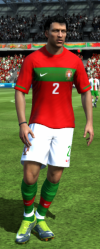
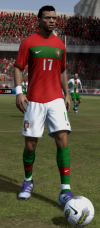
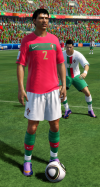
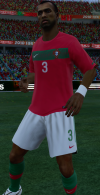
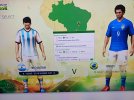
FiFA [2006-2011] Next gen ports via RPCS3 and Xenia

Thanks to a valuable suggestion by our legend Rinaldo, I finally managed to alter the hotspot values in the RX3 files via HxD:
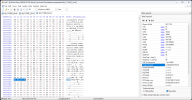
Screenshot 2026-08-08 154111.png

Now we can move shorts numbers (but I guess every other element depending on hotspots, I also tried with the sleeve patches) around the kit.

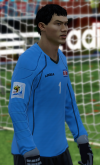
For example, here I moved North Korea's numbers to the right leg, and moved the patch on the GK kit lower so it would not interfere with the shoulder pad:
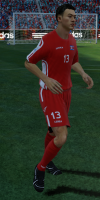
Screenshot 2026-08-08 154152.pngScreenshot 2026-08-08 153514.png

I'm sooooo happy! 🤩
 
I'm having some luck in editing the .rx3 containers in Creation Master 14, exporting them and then converting them to the 2010 World Cup format via FIFA Converter.
The only downside I can see is that the sleeve badges disappear. I could also think to add them as an overlay directly on the kits, but this would mean that either every team with the added overlay has a "qualifiers" kit set or then World Cup badges would appear also during qualifiers.
Other options (which I'll soon try) would be either modifying the values in the .rx3 files with HxD (Rinaldo has been kind enough to give me some guidance, even if I don't think I could fully understand it yet) or asking tokke001 from Soccergaming to add a "import hotspots" function to FIFA Converter so they could be imported from a text file.

There's still long to go, but at least the road now isn't anymore as dark as it was when I started. It's just sooooo loooooooooooooooooooooong.
why using creation master 14 instead of 11? maybe thats why you have sleeve badge problem
here you can find all tokke's tools, mainly focused on fifa 11:
https://soccergaming.com/forums/threads/programs-files-tokke001.180712/
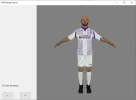
he also has a model viewer tool, maybe it will save you time when u want to preview a kit, instead on going in game every time:
1786208041676.png
 
why using creation master 14 instead of 11? maybe thats why you have sleeve badge problem
here you can find all tokke's tools, mainly focused on fifa 11:
https://soccergaming.com/forums/threads/programs-files-tokke001.180712/
he also has a model viewer tool, maybe it will save you time when u want to preview a kit, instead on going in game every time:
View attachment 437705
As far as I know, no regular Xbox 360 FIFA game had hotspots for sleeve patches (so there would be no benefit in using FIFA 11 rx3 containers over FIFA 14 ones).
I chose FIFA 14 because I tried to import also body models from FIFA 14 to the 2010 World Cup game (with some issues which I believe I already talked about).

Thanks for sharing the link to the model viewer though, I wasn’t aware of that!
 
BAD news for me.

Upgraded to 9800 x3d and FIFA 07 no longer works. After I get into match, the screen remains black.

WC 06 worked. Idk how fifa 08-2014 will peform.

FIFA 07 went from playable with workarounds to completely unplayable 💀

Vulkan, Dx12, nothing works. Amazing.
 
As far as I know, no regular Xbox 360 FIFA game had hotspots for sleeve patches (so there would be no benefit in using FIFA 11 rx3 containers over FIFA 14 ones).
I chose FIFA 14 because I tried to import also body models from FIFA 14 to the 2010 World Cup game (with some issues which I believe I already talked about).
no, i meant to edit wc 2010 ps3 rx3 directly in creation master 11
what about using fifa 11 body models to wc 2010? this mean you can use pc kits, which can be easily created with fifakitcreator and converted with another tool
BAD news for me.

Upgraded to 9800 x3d and FIFA 07 no longer works. After I get into match, the screen remains black.

WC 06 worked. Idk how fifa 08-2014 will peform.

FIFA 07 went from playable with workarounds to completely unplayable 💀

Vulkan, Dx12, nothing works. Amazing.
that sucks about these emulated games, any update of rpcs3/xenia/gpu driver/windows can break it
im wondering how long it will take until we can do some proper pc ports of these
 
no, i meant to edit wc 2010 ps3 rx3 directly in creation master 11
what about using fifa 11 body models to wc 2010? this mean you can use pc kits, which can be easily created with fifakitcreator and converted with another tool
Due to the fact that FIFA 11 (and subsequent) don't have sleeve patch hotspots, I believe Creation Master doesn't handle them. Otherwise Rinaldo (its creator), when I asked him for help, would just have answered me "use them with CM 11 and you'd be able to edit anything".

I was considering using FIFA 11 PC models, that's true, but it looks like FIFA 11 PC has less 3D models per kit type than the 2010 World Cup game has (probably because it's based on FIFA 10). I'll have to try FIFA 11 Xbox One (or PS3) and see how many of then I can find there, and how they behave.

On top of that, UV map of FIFA 11 PC models is a bit distorted in comparison to the ones of console games (see the below comparison between, from left to right, 2010 World Cup, FIFA 11 PC, FIFA 11 Xbox 360 and FIFA 12 PC, especially in the chest area):
Screenshot 2026-08-09 103356.pngScreenshot 2026-08-09 102029.pngScreenshot 2026-08-09 102931.pngScreenshot 2026-08-09 102038.png

Now that I can move hotspots, though, I'm tempted to keep everything original (as in "only use models and containers that were originally available in the game"), also to preserve the feeling.
I mean, I know some wquld love to have ultra detailed kits, faces, stadiums... But then they'd just be better off playing FC 26 with the "World Cup Rewind" mod by Skoczek.
 
Due to the fact that FIFA 11 (and subsequent) don't have sleeve patch hotspots, I believe Creation Master doesn't handle them. Otherwise Rinaldo (its creator), when I asked him for help, would just have answered me "use them with CM 11 and you'd be able to edit anything".

I was considering using FIFA 11 PC models, that's true, but it looks like FIFA 11 PC has less 3D models per kit type than the 2010 World Cup game has (probably because it's based on FIFA 10). I'll have to try FIFA 11 Xbox One (or PS3) and see how many of then I can find there, and how they behave.

On top of that, UV map of FIFA 11 PC models is a bit distorted in comparison to the ones of console games (see the below comparison between, from left to right, 2010 World Cup, FIFA 11 PC, FIFA 11 Xbox 360 and FIFA 12 PC, especially in the chest area):
View attachment 437828View attachment 437825View attachment 437827View attachment 437826

Now that I can move hotspots, though, I'm tempted to keep everything original (as in "only use models and containers that were originally available in the game"), also to preserve the feeling.
I mean, I know some wquld love to have ultra detailed kits, faces, stadiums... But then they'd just be better off playing FC 26 with the "World Cup Rewind" mod by Skoczek.
you are totally right!
i was just trying to help and give some suggestions
glad that you are well prepared and documented
 
I mean, I know some wquld love to have ultra detailed kits, faces, stadiums... But then they'd just be better off playing FC 26 with the "World Cup Rewind" mod by Skoczek.
about that, i realised no mod can replace the original game
i really enjoyed rewind mod but misses a lot of things, although a lot of work has been done for it
in the wc2010 original game you have all national teams, qualification + final tournament, stadiums, proper detailed commentary, and little details like "did you know?" about some countries like DR Congo and so on, which sadly EA stopped doing in wc like 2018,2022, euro 2024 dlcs
its also the nostalgia and the good gameplay of that time
about faces, i was just suggesting adding missing faces from games like fifa 11 pc, fo3, fo4, and maybe fifa 12
not replacing all existing ones with icons from fc 26/pes, as it will break the art style and nostalgia of that time, having different faces from games from different decades will look horrible
 
i think what i want might be too much, probably a revolution mod might be needed to add faces for players who doesnt have
anyway, are you planning to also update the minikits?
 
This is promising: a PS3 recompiler. If one of you eggheads can figure out how to recompile one of these games to PC, you could theoretically fix all the LOD and lighting issues, and run at full performance. Furthermore, you could edit/mod the game.

And there similarly appears to be an X360 recompiler that was used successfully to port Condemned 2.
 
Last edited:
i was just trying to help and give some suggestions
I appreciate it! Otherwise I would not engage in "technical" talking that many people find boring, or just plain annoying.
Truth be told, I'm not that well prepared (or, at least, I was not when I started exploring what I could do and what I couldn't with the game), I'm learnong things as I go and I'm still underway.
There's been many times in which I had to scrap the entire game directory and start from scratch, at the beginning, or from the latest backup (now that some kits have already been imported).

Talking about minikits: I haven't tried them because both minikits and country flags are in .big format and I haven't got my head around them yet. I must see if there's a tool that allows me to export the (.dds I guess?) images in them and then re-import them without breaking the file structure/indexes/whatever.
 
Talking about minikits: I haven't tried them because both minikits and country flags are in .big format and I haven't got my head around them yet. I must see if there's a tool that allows me to export the (.dds I guess?) images in them and then re-import them without breaking the file structure/indexes/whatever.
check these:
https://soccergaming.com/forums/threads/programs-files-tokke001.180712/page-31#post-6769083
https://dl.fifa-infinity.com/fifa-11/tools-fifa11downloads/mini-kit-tool-beta-1-2/
have to check if fifa converter also has similar function, will be weird not to, since tokke is mainly focusing on fifa 11
 
guest_scheduler=false

Seems to fix the black screen issue on FIFA 07 on my new CPU.
Happy you got it working!


@Vndrew I spent a couple of hours last night trying to figure out how to handle minikits, and... Unfortunately I have some mixed news for you.

Good news: there are tools that can read and extract them (for example QuickBMS with the appropriate scripts or BIG GUI).
Upon extracting the files with BIG GUI, I see that PS3 and Xbox 360 files are different (at least, file "2" is a DDS file in PS3 and can be opened just renaming it to "2.dds" but on Xbox 360 it is a strange "XPR" file which seems Xbox proprietary. QuickBMS has a script for those, haven't tried it yet).

I tried to create a minikit with the tool by MonkeyDragon, but apparently if I load it Xenia crashes while trying to display it.

Then I made some other tests:
  • I tried extracting the .big file with QuickBMS (with the BIG4/BIGF script) and then repacking it with the same script (without modifying anything in the extracted files) and Xenia also crashes. The same happens also if I extract and re-import file "2" with BIG GUI unfortunately.
    This is, at the moment, the thing that worries me the most (as it seems that no tool is able to rebuild the .BIG file in a way that Xenia can read)
  • I tried loading the unmodified file from Xbox 360 and it (as expected) doesn't make Xenia crash, and the minikit is shown correctly (I did it to make sure that File Master extracted them correctly from the data1.big container, and it did).
  • Loading the same unmodified file from PS3 doesn't make Xenia crash either, at the cost of not having the minikit shown on screen (that's when I discovered that the fioles were different from each other).
  • Loading an unpacked/repacked file from PS3 (without changing the content) also makes Xenia crash (so, again, there's something going wrong while rebuilding it I assume).
I've got the feeling that I hit a roadblock this time. I'll leave it as it is for a while (we'll have some unlicensed minikits maybe).
Maybe down the line I'll try and give it another go.

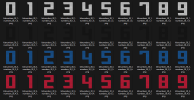
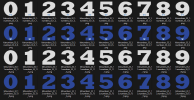
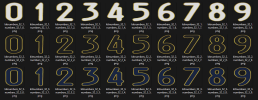
Now I'm collecting additional kitnumbers/jerseyfonts for the 32 finalists to make up for EA's laziness. 🤣
 
Last edited:
Happy you got it working!


@Vndrew I spent a couple of hours last night trying to figure out how to handle minikits, and... Unfortunately I have some mixed news for you.

Good news: there are tools that can read and extract them (for example QuickBMS with the appropriate scripts or BIG GUI).
Upon extracting the files with BIG GUI, I see that PS3 and Xbox 360 files are different (at least, file "2" is a DDS file in PS3 and can be opened just renaming it to "2.dds" but on Xbox 360 it is a strange "XPR" file which seems Xbox proprietary. QuickBMS has a script for those, haven't tried it yet).

I tried to create a minikit with the tool by MonkeyDragon, but apparently if I load it Xenia crashes while trying to display it.

Then I made some other tests:
  • I tried extracting the .big file with QuickBMS (with the BIG4/BIGF script) and then repacking it with the same script (without modifying anything in the extracted files) and Xenia also crashes. The same happens also if I extract and re-import file "2" with BIG GUI unfortunately.
    This is, at the moment, the thing that worries me the most (as it seems that no tool is able to rebuild the .BIG file in a way that Xenia can read)
  • I tried loading the unmodified file from Xbox 360 and it (as expected) doesn't make Xenia crash, and the minikit is shown correctly (I did it to make sure that File Master extracted them correctly from the data1.big container, and it did).
  • Loading the same unmodified file from PS3 doesn't make Xenia crash either, at the cost of not having the minikit shown on screen (that's when I discovered that the fioles were different from each other).
  • Loading an unpacked/repacked file from PS3 (without changing the content) also makes Xenia crash (so, again, there's something going wrong while rebuilding it I assume).
I've got the feeling that I hit a roadblock this time. I'll leave it as it is for a while (we'll have some unlicensed minikits maybe).
Maybe down the line I'll try and give it another go.

Now I'm collecting additional kitnumbers/jerseyfonts for the 32 finalists to make up for EA's laziness. 🤣
i assume you did regenerate
at first i thought u used a wrong dds format, but since its crashing if you export and import back same file, doesnt make sense
might just be xenia fault on how it reads the files, idk
you should ask tokke about it if u decided to also do them

edit:
seems like minikits and minifaces on xbox360 are located inside xpr file:
https://soccergaming.com/forums/thr...-fifa-11-tokke001.6471127/page-5#post-6731621
https://soccergaming.com/forums/threads/fifa-converter-models-textures.6468102/page-81#post-6875819
 
Last edited:
Thanks pal! Yes I broke down the file structure (more info on SoccerGaming as there's a kinda dedicated thread so I won't mess this up more than this) and I'll perform some more tests sooner or later.

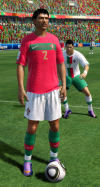
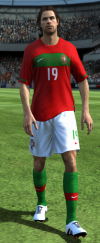
Meanwhile... Doesn't Portugal look way better now with correct numbering?
1786482463684.pngScreenshot 2026-08-11 230541.png
(just sayin')
 
Happy you got it working!


@Vndrew I spent a couple of hours last night trying to figure out how to handle minikits, and... Unfortunately I have some mixed news for you.

Good news: there are tools that can read and extract them (for example QuickBMS with the appropriate scripts or BIG GUI).
Upon extracting the files with BIG GUI, I see that PS3 and Xbox 360 files are different (at least, file "2" is a DDS file in PS3 and can be opened just renaming it to "2.dds" but on Xbox 360 it is a strange "XPR" file which seems Xbox proprietary. QuickBMS has a script for those, haven't tried it yet).

I tried to create a minikit with the tool by MonkeyDragon, but apparently if I load it Xenia crashes while trying to display it.

Then I made some other tests:
  • I tried extracting the .big file with QuickBMS (with the BIG4/BIGF script) and then repacking it with the same script (without modifying anything in the extracted files) and Xenia also crashes. The same happens also if I extract and re-import file "2" with BIG GUI unfortunately.
    This is, at the moment, the thing that worries me the most (as it seems that no tool is able to rebuild the .BIG file in a way that Xenia can read)
  • I tried loading the unmodified file from Xbox 360 and it (as expected) doesn't make Xenia crash, and the minikit is shown correctly (I did it to make sure that File Master extracted them correctly from the data1.big container, and it did).
  • Loading the same unmodified file from PS3 doesn't make Xenia crash either, at the cost of not having the minikit shown on screen (that's when I discovered that the fioles were different from each other).
  • Loading an unpacked/repacked file from PS3 (without changing the content) also makes Xenia crash (so, again, there's something going wrong while rebuilding it I assume).
I've got the feeling that I hit a roadblock this time. I'll leave it as it is for a while (we'll have some unlicensed minikits maybe).
Maybe down the line I'll try and give it another go.

Now I'm collecting additional kitnumbers/jerseyfonts for the 32 finalists to make up for EA's laziness. 🤣
I have all fonts in Rewind 2010, you can use them to your heart's content
 
I have all fonts in Rewind 2010, you can use them to your heart's content
Thank you man, much appreciated!
I got many of them already from subsequent FIFAs but I'm missing some (for example Brazil and Chile) and they'd come handy. I'll have a look at the fifaproject!
 
I was play testing both FIFA 07 and 08 on Xenia and RPCS3, and I get the feeling that the game is skipping frames and not always registering all of my controller inputs. Maybe this is due to the limitations of the emulation? Has anybody else experienced this?
 
I haven't managed to test yet. Job schedule was awful for last two weeks. 16 hours daily duty. I will have some time next week. Will test then.
i finally made some time to test 2010 FIFA World Cup on Xenia Edge and im sad i didnt do it long time ago
it simply runs way better for me than on rpcs3, player names bug and all visual artifacts i had are now gone
i also tested tournament mode and seems fine if you go in menu after each match (no hud disappearing & no crash)
i got kits update working but i cant seem to get flag themed balls and squads working but i will keep trying, if you have any suggestions on this let me know
3x resolution scale makes it run slower on my laptop but definitely looks great

now its time to patiently wait for @*aLe work of art with everything set up, btw i read your soccergaming posts about console editing and its way more difficult than i thought, no wonder most of my suggestions didnt work

EDIT: seems that you unlock a flag themed ball after you beat that team in tournament mode
so if you beat every team you unlock all of them

EDIT: i managed to also get squads working by renaming the old 2010 squad to today's squad number in game files
weird but now i can finally enjoy this game perfectly
 
Last edited:
Back
Top Bottom