FiFA [2006-2011] Next gen ports via RPCS3 and Xenia

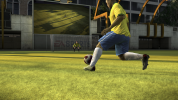
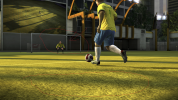
The overall flow of the gameplay feels very satisfying in 2010 WC and the game also feels very responsive. I'd say it's up there with FIFA 14, 16. For me personally it feels much better than the later two.
 
The overall flow of the gameplay feels very satisfying in 2010 WC and the game also feels very responsive. I'd say it's up there with FIFA 14, 16. For me personally it feels much better than the later two.
Hey if you mind, can you tell me what configs you used for the 2010 WC on Xenia? sorry if I sounded stupid xd
 
The overall flow of the gameplay feels very satisfying in 2010 WC and the game also feels very responsive. I'd say it's up there with FIFA 14, 16. For me personally it feels much better than the later two.
Agree. The 2010 World Cup game is one of the best football experiences. I still play the game directly on PS3 and via RPCS3. Both provide the same level of fun with RPCS3 version giving you some extra graphical clarity.
 
Good news, guys! Apparently the DB can be edited and kits can be added.

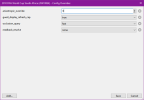
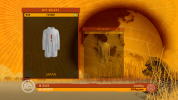
Screenshot 2026-06-22 082917.png

It's not that simple for the ones of us (like me) that are used to Creation Master, but it works!
  • First of all, we'd need to extract the DB from the data0.big.sdat file, and this is done by following these steps:
    • Getting a copy of TrueAncestor EDAT Rebuilder
    • Processing the data0.big.sdat file with the tool (I still don't know if it's being decrypted or just extracted) > Make sure you put the sdat in the appropriate folder otherwise it won't work
    • This will give you a data0.big file that can be read by File Master, so we'd have to put the data0.big file in the /USRDIR folder of the game (where the original sdat file is)
    • I removed temporarily the data0.big.sdat file before opening File Master. It shouldn't be necessary but hey, I did it so I'm telling you
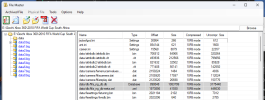
    • Opening File Master 15 (it should work also for regenerating, a thing that 11 to 14 won't do) and extracting the /data/db/fifa_ng_db.db and /data/db/fifa_ng_db-meta.xml files
  • Then, we'd need to put those files into place and make sure they get read by the game
    • Putting those two files in the /data/db/ folder under /USRDIR
    • Regenerating bh with File Master
    • Putting the data0.big.sdat file into place, and removing the data0.big one (once we've regenerated, it shouldn't be necessary anymore)
  • Now it's a matter of converting the DB
    • If you loaded the DB directly with DB Master 11 you'd notice some very strange values (like several teams having the same team ID or entries in the teamkits table that belong to IDs that aren't listed in the teams table) > The DB needs converting from PS3 format to PC format to make it readable.
    • To do so, we'd need a tool called FIFA DB Converter which requires Java 8 to work (so install java 8 from the Java website befire using the tool)
    • Caveat: the tool won't work with Java 21 from Azul (should you have that version installed), it will open but it won't load the files
    • Once you convert the DB with the tool, you'd be given a fifa_ng_db.db and a fifa_ng_db-meta.xml files that are readable by DB Master
  • Let's edit the DB!
    • Now the DB can just be edited normally, so open the files that the converter gave you with DB Master and do the needed changeds (for example I duplicated the record for the Ukraine away kit in the teamkits table and then modified it to make it work for the GK kit which was originally missing)
  • Converting the DB back
    • Once you edited the DB, you'd have to convert it back with FIFA DB Converter to make it work with the PS3 version of the game
    • After converting back the DB, please make sure that the correct files (PS3 ones) are moved in the /USRDIR/data/db folder
  • Now, let's add our first additional kit:
    • To do so I just exported the kit_1366_1_0.rx3 (Ukraine away) with File Master (without regenerating, so the original kit would still be read from within the data3.big file!)
    • I applied the correct textures with RX3 Master (the one included in File Master 15 should work fine)
    • I remaned it to kit_1366_2_0.rx3 and put it into the /USRDIR/data/sceneassets/kit folder
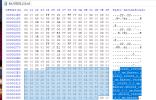
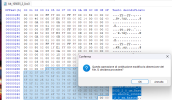
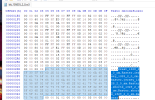
    • IMPORTANT: to make textures be loaded I had to open the file with HxD and manually change the texture names within the file. If you don't do this, the kit will be completely black ingame!
    • To do so, once opened the file with HxD, I had to use the "Replace" function (Ctrl+R) and replace every instance of 1366_1_0 with 1366_2_0 within the file
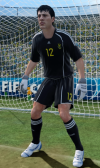
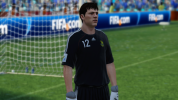
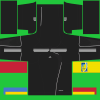
This allowed me to reach the point showed in the image attached: Ukraine GK added in the DB, loaded with the correct textures (I'll make them green sooner or later), and (for the moment) with away kit details like collar shape, number type and colour, hotspots (you'll notice that the number on the shorts has to be moved up a little)

From here on, I believe that the next things to try are...
  • Minikits (both for "changed" kits, e.g. unlicensed ones that become licensed and for "added" ones like this one)
  • Hotspots (I honestly don't have any idea on how to edit them... Maybe with Creation Master 11?)
  • Trying to add "qualifiers" kit sets to teams like Japan that miss them
But I believe that another little step forward has been made.
 
Thanks! I'll have a look for them.

Apparently, meanwhile, tools developed by Rinaldo for the PC versions of FIFA (specifically, File Master 16 and RX3 Master 14) seem to handle 2010 FIFA World Cup files fine.
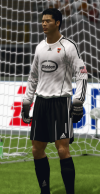
I've been able to extract the Ukraine home kit with File Master, change one of the texturs with RX3 Master, place it in the /USRDIR/data/sceneassets/kit folder and then regenerate the data3.bh file to make the game read the edited rx3 file for Ukraine's home kit from the folder instead of the original one from the data3.big archive.

View attachment 427788

Long way to go, but each journey starts with the first step.

Next steps:
  • See which versions of files (e.g. FIFA 10 PS3, FIFA 11 PC) are compatible and which aren't
  • See if there's a way to extract the DB from the data0.big.sdat file (it looks somehow encrypted to me?) > This could be the way (@Skoczek managed to do it, with that tool, so I guess it's a matter of me finding the tool and getting my head around the way it works) DONE
  • See if the DB files can be opened and edited with DB Master 11 (or a subsequent version) as I'm not sure that PS3 and PC databases are the same, I seem to remember that they needed to be converted somehow DONE
  • See if the changes to the DB can be made permament (making sure that the "edited" DB gets read from the /USRDIR/data/db folder instead of being loaded from the data0.big.sdat archive) DONE
  • See if we could integrate the data from the DLC that you mentioned
Let's keep fingers crossed for this to continue!
mind you asking, what are you cooking?
 
Hey if you mind, can you tell me what configs you used for the 2010 WC on Xenia? sorry if I sounded stupid xd
1782127554173.png

Use Xenia Edge and set the game specific settings to like above screenshot.

Actually, tbh, this game doesn't need any particular configuration. Game runs fine on default settings. You can set the resolution scale to 3x.

This game doesn't seem to require readback_resolve, meaning there won't be that much performance loss fortunately.
 
mind you asking, what are you cooking?
Hi man, thanks for chiming in, you're more than welcome here.

Sure you can ask, thanks for the interest!

Nothing special really, I've been hit by "retro World Cup nostalgia" (and your mods for FC 26 highly contributed to this) so I started playing this game again, starting a save with Japan from the qualifiers.

While playing the qualifiers, I found myself a little bit annoyed at teams that had generic kits and thought that I would have loved to update them if possible.
So, having edited that generation of FIFA games in the past (mainly 12 and 14 plus a little bit of 16, that is similar in structure even if it's on a different engine) and knowing the structure of those games, I started investigating the game files to see if I could replace kit textures (and saw it could be done by placing the files in the correct folder and regenerating, exactly like it's done on PC).

But I also wanted to have correct kitnumber/font colours and collars, so I also had to be able to edit the DB for that.
I thought I'd extract it from the data0.big, but... The first obstacle was the absence of a proper data0.big file in the disc dump I made (which I managed to solve thanks to this suggestion), then after decrypting the data0.big file I could read the DB but it was weird (your FIFA DBs thread on Soccergaming helped me a lot in this case, as it's there that I found this tool).

After being able to convert the DB "back and forth" between the PS3 and PC versions of the game (in order to set proper number colours and collars to the replaced kits for example), I thought "and why not trying to add kits too?"
Well, it turns out that it can be done (at least to some extent, I still don't know how to edit hotspots on kits for example)!

So, I'm still at the beginning of the journey but I kinda see a (long and winding) road ahead. One week ago I wasn't even seeing that!

 
But I believe that another little step forward has been made.
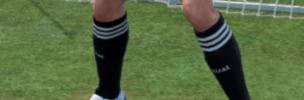
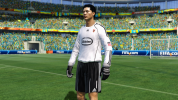
LOL I was so happy that I could add a kit that I didn't even notice that the socks still feature the Ἑλλάς typing 🤣
Screenshot 2026-06-22 171534.png
Well, nothing major. I think that as a first step I'll borrow a couple of GK colorways from 2010 World Cup for every manufacturer I can find (so for example a black and a yellow adidas GK kits, a grey and a black Nike GK kits and so on) and rotate them between the teams that need them. It won't be an ode to variety but it would still be something.
Unfortunately kits from FIFA 11 (which is full of those templates as clubs started using them in the 2010/11 season) has a different way to handle the collare so I don't think textures can be "backported" to 2010 World Cup. I'll have to make do with what I find in there (or design my own).
 
Is it possible to edit the db of x360 too using the same method of ps3 version?
I'll have a try in the coming days. If it's like World Cup 2006, in which after extracting the files with QuickBMS you could just put them in the correct folder and the game would load them before the ones in the archives (see how disabling audio in that game works) maybe we'd also be able to avoid regenerating on Xbox 360.
 
View attachment 427906

Use Xenia Edge and set the game specific settings to like above screenshot.

Actually, tbh, this game doesn't need any particular configuration. Game runs fine on default settings. You can set the resolution scale to 3x.

This game doesn't seem to require readback_resolve, meaning there won't be that much performance loss fortunately.
Thank you so much! :D
 
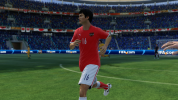
Update: apparently "qualifiers" kits (ID 9, 10 and 11) can be added too. I tried with Japan (without inserting any texture, only editing the DB) and:
  • During the qualifying campaign, both "qualifying" and "World Cup" kits are selectable (might check against a team that has both the sets by default, because I excpected that only qualifying kits would work at the beginning of the campaign but maybe I'm wrong)
  • Minikits for kits 9 and 10 (couldn't try 11 during the kit selection process as it's reserved for keepers) are white with a huge red exclamation mark on them (sign of a missing file/texture I guess) in the kit selection screen.
    I skipped the match intro because I was curious to see the player textures so I couldn't see what happened to kit 11 but I believe it's the same.
  • Players are wrapped in a blue and purple chequered pattern during the match (sign of missing files I believe, as file loaded but textures missing would result in a completely black outfit)
I'll have to see if there's a flag in the DB which indicates which kits should be selectable during qualifiers and/or during the main tournament (although I expect that during the actual tournament only kits which have type 0, 1 and 2 would get used).

I've never been this hyped about editina a videogame in God knows how many years, folks! 🤩
This is probably a better feeling than when I tried to discover whether new managers could be added to PES 2020 or not.
 
Last edited:
Back
Top Bottom