FiFA [2006-2011 and 2014] Next gen ports via RPCS3, Xenia and ShadPs4

1792822705366.png

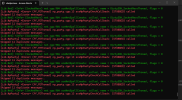
This normal in FIFA 14 on shadps4? It goes on forever. Aside from this I don't see too much problems in the gameplay.
 
Normal? Probably not. Something is failing on emulation maybe. Does the game still play near correctly? Yeah. So I don't feel bothered by it and pray it's nothing serious. Errors show up when playing on RPCS3 as well.
 
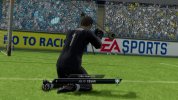
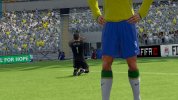
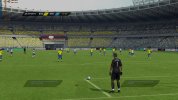
2010 FIFA World Cup - Enable 3D Grass during cutscenes patch (Xbox 360):
Download here

Instructions:

1. Go to C:\Users\[username]\Documents\Xenia\patches
or alternatively, just open Xenia edge, and single click on the game icon to show the details menu, and then on patches section, click on open folder to redirect you to above folder location.
2. Paste the .toml file you just downloaded.
3. Open Xenia Edge and after single click on the game icon, go to patches section and make sure the patch is enabled/checked.


Keep in mind:
I only tested it with my copy of the game. Title ID is 454108E4
Idk if the patch will work on other regions. Memory address should be same but I can't be sure of that. Test it out guys and let me know.
Screenshots:


Last edited:
2010 FIFA World Cup updated Patch
3D Grass draw distance update + Max player LOD during gameplay camera:
Download Here
Like before, extract the contents of the downloaded .zip file and put the contents in the patches folder of Xenia here, "C:\Users\[username]\Documents\Xenia\patches"
Open Xenia Edge and set it up like this:
1793252999341.png

3D Grass Test A: always draw fin grass -> Must be enabled for 3D grass to appear on cutscenes.
Player LOD: force highest LOD (active_lods =1) -> Must be enabled for increasing the player LOD during gameplay.


Additionally you can increase the draw distance by enabling only one of the following draw distance multipliers:
3D grass: FOV-independent draw distance x10/20/25/50


x50 nearly enables 3D grass for full distance of the field on cutscenes, free kicks, goal kicks, penalty kicks. However it is performance heavy. Another downside of a very high draw distance 3D grass is that the 3D grass shader doesn't contain any mow pattern lighting. So no mow pattern is visible. The 3D grass .fx shaders has to be edited along with other .lua and script files for it to work and it's not possible yet. I might try it in future.

In such cases you can instead use a lower multiplier like x10 which should increase the 3D grass draw distance enough to make it visible with a higher density on all cutscenes but not invasive enough to cover all the 3D grass. Or you can just uncheck all the multipliers and simple enable 3D grass on cutscenes with the default draw distance which already looks better than no 3D grass but has low enough density to the point where mow patterns are not hidden.


Once again, tested on my dump of the rom. Might not work on other regions if memory address are different. Try it out and give feedback.

Screenshots of Max LOD:


Screenshot of x50 3D grass draw distance:
 
Last edited:


Made progress on 3D grass in FIFA 14 World Cup as well. However, it's not usable by any means. While 3D grass is finally visible on cutscenes, it's flickering all over the place and is a mess. It's like the game is struggling to set a fixed coordinate for the grass. Unless I can fix it, it's pointless. Also, FIFA 14 WC being FIFA 14 wc, the 3d grass color looks too dark. I have to manually change the color and brightness details of it and it seems to vary from stadium to stadium and not something simple like FIFA 09/10 pc ports. So who knows if it's even feasible.
 
Guys! I've finally done it! 3D grass on FIFA 14 World Cup. Looks super great here since mow patterns also work over the 3D grass unlike 10 WC.

2014 FIFA World Cup - 3D Grass enable in cutscene and Set pieces with Increased 3D grass draw distance patch

Download Link (Click here)


Instructions:

Like with the previously posted FIFA 10 WC patch, simply unzip and paste the .toml file in "C:\Users\[username]\Documents\Xenia\patches"

Open Xenia Edge and single click on 2014 FIFA WC and go to patches section and enable the following options:

1793309276184.png


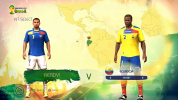
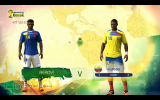
Screenshots:


Some limitations:

While freekick still has 3D grass, goal kick and penalties don't have 3D grass yet. However, cutscenes always have 3D grass now, which is a significant improvement.
 
Last edited:
Yo bro thanks for the mod
i have question can i do the same thing to install the mods on rpcs3
Only the LOD and Kit wrinkles will work since they modify the assets.

The 3D grass patch itself will not work since the memory address will be different for the ps3 executable.
 
Mega job @Sami 1999 !!
I spent hours fiddling around with .ini modifications to achieve the same but never got it to look as good as yours.
Could the same be done to FIFA 09, UCL 07, etc?
Also is it possible to enhance DoF & Bloom? these effects seem to break with upscaled resolutions
 
Mega job @Sami 1999 !!
I spent hours fiddling around with .ini modifications to achieve the same but never got it to look as good as yours.
Could the same be done to FIFA 09, UCL 07, etc?
Also is it possible to enhance DoF & Bloom? these effects seem to break with upscaled resolutions

Yeah, over the last 13 years, I've tried modifying the lua files and shader files and those never did anything. And more importantly, never brought the 3d grass back on actual cutscenes. The culprit seemed to be on the executable files itself and modifying it seems to be the only solution so far.

Theoretically, it should be possible on those games. My first attempt on FIFA 10 has failed but it should be possible. As for fifa 09, it was giving me a hard time decrypting the executable. I managed to decrypt the executable and still trying to look into it.

As for FIFA 08, (and likely FIFA 07 and UCL 06-07 as a result) I was having a lot of trouble getting to increase the range of 3D grass. Nothing I'm trying is changing anything with the 3D grass. FIFA 08 in particular would benefit a lot since 3d grass is already present in fifa 08 but it's draw distance is so short its not visible on most cutscenes. I however, did manage to get max LOD to work on FIFA 08 successfully. Cloth physics and hair physics still dont work during gameplay but LOD improvement itself was massive. The game code seems to mention Depth of field in fifa 08 but we all know DOF does not work on this game at all. Idk if the shader itself is missing or it's a coding error. If it's the former, then fixing it via patch alone wont be possible and we have to likely port DOF shader from FIFA 07/09. We shall see if anything can be done regarding that.

FIFA 07 and UCL 06-07 I will handle last, because the 3D grass already has decent coverage in these games and looks good. So once other games where 3d grass isn't even rendered are fixed- I will come back to these games.

DOF tbh looks fairly decent and has only minor artifacts. This will be the last thing I look for since before that we still have one big problem to solve and which seems to be the hardest- removing the 60 FPS cap on cutscenes and have the camera panning and cutscene animations actually run at 60 fps. Managed to remove the 30 fps cap itself after a lot of tinkering but the animations and panning is still 30 hz which makes it pointless. Worst case scenario- we have to redo the animations again which would make the scope of such mod near impossible.
 
What do you think of the PC ports that are being released? From what I’ve found, we already have FIFA 08, FIFA 09, FWC 2010, and FWC 2014, with FWC 2006 currently in development by the same creator behind the FIFA 08 port also on the way. Is it worth playing these native versions, or is using an emulator still the better option?
 
What do you think of the PC ports that are being released? From what I’ve found, we already have FIFA 08, FIFA 09, FWC 2010, and FWC 2014, with FWC 2006 currently in development by the same creator behind the FIFA 08 port also on the way. Is it worth playing these native versions, or is using an emulator still the better option?

Only reason I would switch to those decomp ports will be if:

1. Cutscenes 60 FPS is supported.
2. My 3d grass patches can be ported there.
3. Runs better than xenia.

So for, the decomps achieve none of those yet. We shall see if they improve it or just leave it as is.
 
Only reason I would switch to those decomp ports will be if:

1. Cutscenes 60 FPS is supported.
2. My 3d grass patches can be ported there.
3. Runs better than xenia.

So for, the decomps achieve none of those yet. We shall see if they improve it or just leave it as is.
ive only tried wc2010, 2014 and fifa street
all these get updates once a few days/almost daily, so there are better chances for your desires to become reality if you write them on their github than waiting for xenia/rpcs3 teams to do them
wc2014 and fifa street have a launcher which auto updates when a new version is released
wc2010 is the only one which runs worse for me than on xenia, a lot of overheat, and the launcher sucks, have to install everything all over again for each update (it also takes around 20-40 mins to install it)

2. My 3d grass patches can be ported there.
im interested in this, will investigate
 
WC 14 is unplayable for me on the recomps so far. I will open an issue and ask them if they can implement 60+ FPS cutscenes. That is the most important part.
 
Haven't made good progress on FIFA 08 and 09. Attempt on increasing the draw distance of 3D grass has been an utter failure. However, did made small improvements to other things:

FIFA 08 Patch: Click here to download
-LOD maxed out and runs at full quality during gameplay. Player self shadows are likely bugged on some distances.
FIFA 09 Patch: Click here to download
-3D grass enabled during cutscenes: However, the draw distance is so poor, it's barely visible and when it's visible, it's so transparent and barely covers the field. Near pointless but at least it shows up on cutscenes now.
-LOD maxed out: However has self shadow bugs.
-Optional self shadow disabler- so that the game looks consistent. But it is a downgrade.
All of my patches so far have been for NTSC copy of the games. These will likely no work on other regions of the games. Title ID does not differ between each regions and is same for a game on all regions.
However, the Media ID can deter what region your game is. These are the Media ID of my copy of the games. So before trying to get the patch to work, make sure your media ID matches or it will likely not work.
FIFA 08: 00AA6EE3
FIFA 09: 67C72A27
FIFA World Cup 2010: 49D5A944
FIFA World Cup 2014: 290A9ADA
 
FIFA 10 - 3D Grass enable in cutscene and Set pieces with Increased 3D grass draw distance patch

Download link (Click here to download)

Media ID: 51068943 (NTSC)

Instructions:
Like with the previously posted FIFA 10 WC patch, simply unzip and paste the .toml file in "C:\Users\[username]\Documents\Xenia\patches"

Xenia_Edge_Screenshot_2026.11.05_-_11.20.31.60.jpg
Xenia_Edge_Screenshot_2026.11.05_-_11.21.24.02.jpg
Xenia_Edge_Screenshot_2026.11.05_-_11.22.50.62.jpg


Gameplay footage:
 
Last edited:
Experimental FIFA 14 World Cup patch builder:
As you have seen. Xenia only supports patches that directly changes the memory addresses [or whatever the term is] which means even a simple title update or even the same game from different region will not work with a patch which is made for a particular region+ particular title update.

What this patch builder does instead is look for the function calls instead and then looks for the memory address in the xex file you are using and makes a patch file.


This will require few things: You have to have python installed. If your xex file is encrypted, you will likely have to decrypt it with xextool. Not only that, the decrypted .pe file will also have issues with the memory address which is why I had such a hard time getting patches work for FIFA 09 and 10 which were showing wrong values. Nevertheless, I think FIFA 14 WC xex files do not use LZX compression and you will likely not have any trouble, at least I hope.

Instructions on how to use it:

1. Put make_grass_patch.py and the game's default.xex in one folder. Open a terminal (Command Prompt or PowerShell on Windows) in that folder. In File Explorer you can type cmd in the address bar and press Enter.

2. Run: pip install cryptography. The XEX is encrypted and Python can't read it without this. It's a one-time step. If your default.xex is already decrypted, you can skip it.

3. Xenia only applies a patch file if its hash matches the game's executable. In Xenia's config file, set log_level to 2 or higher. Then run the game once and close Xenia. Open xenia.log and search for 'Module hash' (ignore case). Copy the 16-character value. It must be uppercase, like B07B8840D540FF7A. In this case, the module is for default.xex (keep in mind some other fifa games uses other .xex files instead of default.xex so you have to be wary of that)

4. Run: python make_grass_patch.py default.xex --hash YOUR_HASH_HERE. Use your real hash, not the placeholder. If a path has spaces, wrap it in quotes. You can add -o somename.toml to choose the output file name.

5. On success you'll see each site it found (enable offset, draw-distance hook, draw wrapper with 'tier 1' or 'tier 2', and the code caves) and then 'wrote 454109D4 - 2014 FIFA World Cup Brazil.patch.toml'. If it prints ERROR instead, no file is written- and that means you are screwed and this stupid thing did not work.

If it works, it should make a patch file that you can place and test it on your copy of FIFA 14 WC. Obviously, if it's the same region as mine then the patch that was already uploaded should just work. If it doesn't and you have different region copy/ or even same region with slightly different version for some reason, then this might work.

I've attached the python script in a .7z file. Download it and test it. Send feedback.

If this technique works, then we can likely make all of my 3D grass and LOD patches compatible with all regions of the games.
 

Attachments

I don’t think the average person here has a python environment on their computer. I think you’re better off compiling this into an executable with a GUI where the user can point to their xex file for patching.
 
2006 FIFA World Cup - Max LOD patch (Click here to download)

A simple patch that forces the game to use max LOD all the time, including gameplay.

Media ID: 0D864D9C (NTSC copy)

Original intent was to uncap the framerate, enable linesman on top of maxing out the LOD. But the former two efforts were futile. For now LODs are improved. Not that this game had bad looking LOD in the first place. But on 4k+ screens you can see the lower poly generic head models used during gameplay camera. With LODs maxed out, the faces now look better.

I wonder if this can be implemented on RTWC 06 too since there's cloth physics in that game. Having cloth physics during gameplay camera would be nice.

@sleevel That is a good idea. However, I'm limited by free claude's use. So making gui right now is not feasible, especially since I can't even confirm if the patch builder actually works. Unless proven to be useable, making GUI wouldn't be a great idea.
 
FIFA 10 Patch update- Max LOD (new) + Cutscene 3D grass with increased draw distance (Click here to download)

Maxed out the LOD. Now players are rendered in full detail even from gameplay cameras. Rest of the 3D grass enhancements are same as before. I attempted on forcing 3D grass during gameplay camera but that did not work out.

Media ID: 51068943 (NTSC)

Instructions:
Like with the previously posted FIFA 10 WC patch, simply unzip and paste the .toml file in "C:\Users\[username]\Documents\Xenia\patches"
 
Not directly related to this thread topic:

FIFA 06 and 2006 FIFA World Cup's original Xbox version now runs very smoothly on the new Xbox emulator known as Xbased. These games were already booting on Xemu but the performance was abysmal there, especially with last 1-2 years of Xemu builds.

No on Xbased, the game runs with near 0 FPS drops at 4k, even cutscenes are locked 60 and the best part is you can mod the game and max out the LODs like pc version and the game still runs at locked 60. This was not possible on Xemu since the game would drop to 30-40 fps with maxed out LODs regardless of GPU usage.

Why the Xbox versions of these games are relevant:

FIFA 06, 06wc and 07 xbox ports are the only version where the 3D grass is still visible. PS2 and PC version's 3D grass got removed after FIFA 2005.
Other than the missing 3D grass, the overall post fx shaders like bloom, color grading and DOF are all also present on Xbox port whereas they are completely missing on PC port. DOF does look better on PS2 though, that's the one thing the ps2 port excels at.

FIFA 2004 xbox port is the best looking version too, with the best looking color grading and the grass looks bright unlike the pc port where it was dark asf. Game runs at smooth 60 too. However, this still has the same bug as xemu where the menus are blacked out until you start a match- after which the menus become visible when you go back. FIFA 2005 og xbox port while looking the best actually suffers from too much bright pitch to the point my eyes hurt. So maybe the ps2 port/ pc version if 30 fps cap can be removed might be the better version for that.

 
Back
Top Bottom