[SOLVED] PES 6 stuttering in fullscreen at higher resolutions

ahalcon86

Non-League
Joined
18 February 2023
Hi, I’m having a strange issue on my gaming laptop with "PES 6 PC version: Temporada 1998/99 Cevedale Patch" -

Specs:
  • GTX 1050
  • Intel HD Graphics 630
  • 1920×1080 60 Hz display
The game runs smoothly at lower resolutions, but starts stuttering at 1680×1050 and 1920×1080 fullscreen.

Lowering the graphics quality makes no difference, and I’ve also set pes6.exe to use the GTX 1050 in Windows Graphics Settings.

What’s strange is that I’ve never had this problem with other PES 6 patches or even with PES 6 running through a PS2 emulator.

I just want to get the game running smoothly in fullscreen without black bars.

Could this be related to PES 6’s fullscreen/rendering system, the Intel HD 630 + GTX 1050 setup, or the patch?

Any ideas? Thanks in advance.
 
 
Thank you very much, I'm going to try this!
Where can I get the dgvoodoo2 wrapper files posted by @Ciais as can't find them?

thanks
 
Thank you very much, I'm going to try this!
Where can I get the dgvoodoo2 wrapper files posted by @Ciais as can't find them?

thanks

There you have it mate: https://www.mediafire.com/file/7ovwhkfy7gzs70w/PES5-WE9_Stuttering_%2B_Tearing_Fix.rar/file

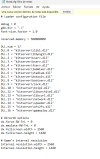
Be sure also to follow those steps regarding kload.cfg config as resolution, change the speeder to 1.0 and so on. Those fixes acts differently depending on the PC, but generally I tested it on 2 desktop PCs and 1 laptop and classic PES games are working smooth. Wish you the best of luck & have fun enjoying PES classics!
 
There you have it mate: https://www.mediafire.com/file/7ovwhkfy7gzs70w/PES5-WE9_Stuttering_%2B_Tearing_Fix.rar/file

Be sure also to follow those steps regarding kload.cfg config as resolution, change the speeder to 1.0 and so on. Those fixes acts differently depending on the PC, but generally I tested it on 2 desktop PCs and 1 laptop and classic PES games are working smooth. Wish you the best of luck & have fun enjoying PES classics!
Legend :) I'm going to try it during the weekend and I'll send an update.
Even though it stays PES5/WE5 is working on the PES6?
 
Legend :) I'm going to try it during the weekend and I'll send an update.
Even though it stays PES5/WE5 is working on the PES6?
@etb10dmk @Ciais it's working properly now :APPLAUD: thank you very much!!! I left the speed 0.97 though and it's good and I didn't reinstalled the game neither. You saved me as I had created a master league with a specific groups composition, modified the name of cups, some squads and players and that took me some time... I can play with all that now
 
@etb10dmk @Ciais it's working properly now :APPLAUD: thank you very much!!! I left the speed 0.97 though and it's good and I didn't reinstalled the game neither. You saved me as I had created a master league with a specific groups composition, modified the name of cups, some squads and players and that took me some time... I can play with all that now

Glad that worked. I used it on more that 60 PES6 parches, plus this dgVoodoo wrapper also works with all classic PES games between PES 3 - 6. Enjoy!
 
Olá, estou tendo um problema estranho no meu laptop gamer com "PES 6 PC version: Temporada 1998/99 Cevedale Patch" -

Especificações:
  • GTX 1050
  • Intel HD Graphics 630
  • Tela de 1920×1080 a 60 Hz
O jogo roda sem problemas em resoluções mais baixas, mas começa a apresentar travamentos em tela cheia nas resoluções 1680×1050 e 1920×1080.

Diminuir a qualidade gráfica não faz diferença, e eu também configurei o pes6.exe para usar a GTX 1050 nas configurações gráficas do Windows.

O que é estranho é que nunca tive esse problema com outros patches do PES 6, nem mesmo com o PES 6 rodando em um emulador de PS2.

Eu só quero que o jogo rode sem problemas em tela cheia, sem barras pretas.

Isso poderia estar relacionado ao sistema de tela cheia/renderização do PES 6, à configuração Intel HD 630 + GTX 1050 ou ao patch?

Alguma ideia? Agradeço desde já.

Usa essas configurações aqui, creio que sanara o problema. É só copiar e colar no Kload.


# Opções do DirectX
dx.force-SW-TnL = 0
dx.emulate-HW-TnL = 0
#dx.fullscreen.width = 800
#dx.fullscreen.height = 600
dx.fullscreen.width = 1366
dx.fullscreen.height = 768

largura.resolução.interna = 800
internal.resolution.height = 600
 
Usa essas configurações aqui, creio que sanara o problema. É só copiar e colar no Kload.


# Opções do DirectX
dx.force-SW-TnL = 0
dx.emulate-HW-TnL = 0
#dx.fullscreen.width = 800
#dx.fullscreen.height = 600
dx.fullscreen.width = 1366
dx.fullscreen.height = 768

largura.resolução.interna = 800
internal.resolution.height = 600
obrigado irmao. so far is working now with the above options :PRAY:
 
Back
Top Bottom