


Sami 1999
Noob
- 28 June 2015
Many PC FIFA ports have been based on old gen versions instead of the then next gen consoles of the time. The state of emulation of Xbox 360, PS3 and PS4 had been poor for many years. But in last few years, huge progress has been made on emulation. On this year alone, many x360 FIFA games have become fully playable and reached near perfect emulation. So has Ps4 emulation of FIFA 14. This thread covers emulation info of next gen FIFA games (Currently covering Xbox 360, PS3 and PS4) along with relevant links and instructions - should the particular fifa games require such info.
Old intro post:
RPCS3:
Xenia:
ShadPS4:
Old intro post:
It was unfortunate that we got old gen ports of some of my favorite FiFA games [2006-2008] on pc and thus I have been keeping an eye on the emulators for quite a long time. The current state of emulating FiFA isn't that great. However, this year RPCS3 got major progress regarding performance on FiFA games.
We went from unplayable slow motion gameplay to almost playable performance. The only thing that's keeping them from being playable are the crashes that occur randomly.
I've some xbox 360 and ps3 copies of some of these games and tested them on my PC. And these are the current state of the games:
We went from unplayable slow motion gameplay to almost playable performance. The only thing that's keeping them from being playable are the crashes that occur randomly.
I've some xbox 360 and ps3 copies of some of these games and tested them on my PC. And these are the current state of the games:
RPCS3:
Fifa 08: Crashes randomly. So sometimes you will crash on start screen, sometimes mid game and sometimes if you are lucky, you will be able to finish a match or even two.
Fifa 09: Random crashes but less than Fifa 08. Sound is awfully broken. Performance is a bit slow. But you can finish more matches than you can with Fifa 08.
Fifa 10: The cursed bug is gone finally and the game seems to be fully playable with some minor graphical bugs, like the player names on the back of the jersey not rendering correctly.
Fifa 10 WC: Playable almost perfectly other than some minor graphical bugs and audio stutters
Fifa 11: Completely playable. There's minor graphic glitch. But you can play the game just fine.
For Fifa 08 and 09: SPU and PPU decoder should be set to LLVM Recompiler.
Write color buffer should be checked.
Disable vertex cache should be checked.
For Fifa 10 and 11: SPU decoder should be set to ASMJIT Recompiler.
Write color buffer should be un-checked.
Disable vertex cache should be un-checked.
Benchmark:
Fifa 09: Random crashes but less than Fifa 08. Sound is awfully broken. Performance is a bit slow. But you can finish more matches than you can with Fifa 08.
Fifa 10: The cursed bug is gone finally and the game seems to be fully playable with some minor graphical bugs, like the player names on the back of the jersey not rendering correctly.
Gameplay:
Cursed bug:
Cursed bug:
Fifa 10 WC: Playable almost perfectly other than some minor graphical bugs and audio stutters
Gameplay:
Fifa 11: Completely playable. There's minor graphic glitch. But you can play the game just fine.
For Fifa 08 and 09: SPU and PPU decoder should be set to LLVM Recompiler.
Write color buffer should be checked.
Disable vertex cache should be checked.
For Fifa 10 and 11: SPU decoder should be set to ASMJIT Recompiler.
Write color buffer should be un-checked.
Disable vertex cache should be un-checked.
Xenia:
FIFA 06: Road to FIFA World Cup [Status: Playable, 4k Ready]
FIFA World Cup: Germany 2006 [Status: Playable]
FIFA 07 [Status: Playable with some workarounds*, 4k Ready]
FIFA 09 [Status: Playable, 4k Ready]
FIFA 10 [Status: Playable, 4k Ready]
2010 FIFA World Cup South Africa [Status: Playable, 4k Ready]
Original post (Kept for the sake of preservation purpose):
Recent update of Xenia fixed some graphical issues on some games, but also increased the performance hit.
Xenia is more GPU heavy and RPCS3 is more CPU heavy.
I tested these games on my 980 Ti and i7 6700k which were clearly not good enough, but works to some extent. As for RPCS3, Vulkan API works best on the games.
Xenia Edge build:
Status: Playable.
Enhancements: Renders in 4k without any missing crowd or artifacts.
Download link of Xenia Edge build:
Github link page
Windows build Mirror 1
Linux build
(Github release links get expired after 6 months, so in that case download from the mirror link)
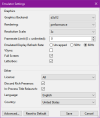
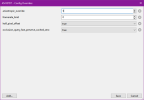
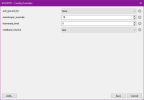
Xenia Edge settings to render the game at 4k without lighting problems:
Gameplay at 4k:
Bugs:
1. Stadium flood lights slightly bleed through the edges of player models even after fixing it with "occlusion_query_fast_preserve_cached_zero = true". This setting also causes the framerate to drop significantly. You will need a very high end GPU and CPU for the game to perform smoothly with this setting. Or you have to stick with lower resolutions.
2. Cloth and hair physics sometimes do not work: no idea why it happens or whether it's a problem with the game itself.
3. Audio sometime has double playback issue, most noticeable with commentaries.
Quick BMS Tool that was used to extract the data.big files
Xenia canary build: (Deprecated - use Xenia Edge build instead)
Testing specs:
CPU: i7 6700k
GPU: RTX 5070 Ti.
Status: Playable.
Enhancements: Renders in 4k without any missing crowd or artifacts.
Download link of Xenia Edge build:
Github link page
Windows build Mirror 1
Linux build
(Github release links get expired after 6 months, so in that case download from the mirror link)
Xenia Edge settings to render the game at 4k without lighting problems:
Gameplay at 4k:
Bugs:
1. Stadium flood lights slightly bleed through the edges of player models even after fixing it with "occlusion_query_fast_preserve_cached_zero = true". This setting also causes the framerate to drop significantly. You will need a very high end GPU and CPU for the game to perform smoothly with this setting. Or you have to stick with lower resolutions.
2. Cloth and hair physics sometimes do not work: no idea why it happens or whether it's a problem with the game itself.
3. Audio sometime has double playback issue, most noticeable with commentaries.
Quick BMS Tool that was used to extract the data.big files
Xenia canary build: (Deprecated - use Xenia Edge build instead)
Game is fully playable with minor bugs here and there. You will need the following build of Xenia canary linked below:
Windows build
Linux build
Settings to be changed in Xenia-canary.config.toml (Open with notepad):
readback_resolve = "fast" [Otherwise the game's lighting will be completely broken]
draw_resolution_scale_x = 1 [Rendering the game in higher resolution breaks the lighting unfortunately]
draw_resolution_scale_y = 1
Some bugs I noticed:
-Random post process glitch in cutscenes: rare but the colors glitches out for few seconds.
-Random artifacts during cutscenes: rare.
-Stadium lights bleed through the player models: Most noticeable on dusk and night matches. Looks wrong but in most cutscenes the camera angles wont be in such situation.
-Cloth and hair physics randomly stops working at times: no idea why it happens or if it's a problem with the game itself
Gameplay footage with this build of Xenia Canary:
https://youtu.be/q9YVsmDjZTQ?si=1Zq3lCVna6lW4oVX
Windows build
Linux build
Settings to be changed in Xenia-canary.config.toml (Open with notepad):
readback_resolve = "fast" [Otherwise the game's lighting will be completely broken]
draw_resolution_scale_x = 1 [Rendering the game in higher resolution breaks the lighting unfortunately]
draw_resolution_scale_y = 1
Some bugs I noticed:
-Random post process glitch in cutscenes: rare but the colors glitches out for few seconds.
-Random artifacts during cutscenes: rare.
-Stadium lights bleed through the player models: Most noticeable on dusk and night matches. Looks wrong but in most cutscenes the camera angles wont be in such situation.
-Cloth and hair physics randomly stops working at times: no idea why it happens or if it's a problem with the game itself
Gameplay footage with this build of Xenia Canary:
https://youtu.be/q9YVsmDjZTQ?si=1Zq3lCVna6lW4oVX
Testing specs:
CPU: i7 6700k
GPU: RTX 5070 Ti.
FIFA World Cup: Germany 2006 [Status: Playable]
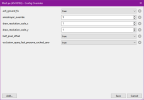
Runs fine with the build of Xenia Edge linked on FIFA 06: Road to FIFA World Cup. Visual bugs present are similar to the previous game. Overall it's very playable with audio fully working. Unfortunately, running this game at 4k will make the crowds disappear. You will have to play at 720p for the crowds to render correctly. You will also need to use "occlusion_query_fast_preserve_cached_zero = true" to fix the stadium flood lights bleeding through player model bug. Like RTWC 06, there's still some slight bleeding on the edge of the player models, likely due to mismatched depth buffer positioning.
Xenia Edge settings:
Gameplay footage:
Xenia Edge settings:
Gameplay footage:
FIFA 07 [Status: Playable with some workarounds*, 4k Ready]
FIFA 07 crash can be avoided by following the github guide. It works really well even though it's kinda cumbersome to execute.
When you are on the stadium/difficulty/match time menu after picking a team and select sides, open task manager and go to details tab. Find Xenia.exe and right click on it and select "set affinity". And then uncheck all the CPUs and then check CPU 0 and 1 and press ok.
Now the game will slow down significantly but you can press A to proceed forward and wait till the loading is complete. You will know the loading is finished when the text goes from "loading" to "press start". Once that happens, you can go back to task manager and set the affinity back to all CPUs so that the game speed normalizes. Go back to emulator and press start and the game will no longer crash.
Gameplay footage:
https://youtu.be/08Xa8afier8
When you are on the stadium/difficulty/match time menu after picking a team and select sides, open task manager and go to details tab. Find Xenia.exe and right click on it and select "set affinity". And then uncheck all the CPUs and then check CPU 0 and 1 and press ok.
Now the game will slow down significantly but you can press A to proceed forward and wait till the loading is complete. You will know the loading is finished when the text goes from "loading" to "press start". Once that happens, you can go back to task manager and set the affinity back to all CPUs so that the game speed normalizes. Go back to emulator and press start and the game will no longer crash.
Gameplay footage:
https://youtu.be/08Xa8afier8
FIFA 09 [Status: Playable, 4k Ready]
Game runs perfectly. Nothing to elaborate.
FIFA 10 [Status: Playable, 4k Ready]
Game runs near perfectly on latest Xenia Canary builds. Even better, you can use 3x resolution scale to run the game in 4k without any visual bugs as a consequence.
Gameplay footage:
https://youtu.be/CnaxbhxDSPQ
Gameplay footage:
https://youtu.be/CnaxbhxDSPQ
2010 FIFA World Cup South Africa [Status: Playable, 4k Ready]
Game runs near perfectly on latest Xenia Canary builds. Even better, you can use 3x resolution scale to run the game in 4k without any visual bugs as a consequence. Just like regular FIFA 10.
Gameplay footage:
https://youtu.be/Ksz4yzPYUfk
Gameplay footage:
https://youtu.be/Ksz4yzPYUfk
Original post (Kept for the sake of preservation purpose):
Fifa RTWC 06: Crashes after EA logo
Update: FMVs load instantly now and you can see the first license detail screen now but the emulator immediately freezes after that.
FiFA WC 06: Sometimes goes as far as the match intro cutscene and then crashes.
Update: Can go up to gameplay but crashes very soon. Performance improved on the recent builds. FMVs load up instantly now.
FiFA 07: Game boots up in latest Xenia canary build. But right after you start a match, it crashes.
FiFA 08: Seems to be finally playable on Xenia canary. Same issues like Euro 08 so it still needs some polishing. Some stadiums have over bright pitch, making it very hard to play on those stadiums on day time even after lowering the brightness in game since the levels are crushed either way.
Oh, by the way. PES 06 [aka PES 07] runs completely fine on Xenia.
Update: FMVs load instantly now and you can see the first license detail screen now but the emulator immediately freezes after that.
FiFA WC 06: Sometimes goes as far as the match intro cutscene and then crashes.
Update: Can go up to gameplay but crashes very soon. Performance improved on the recent builds. FMVs load up instantly now.
Gameplay:
2nd attempt [starting gameplay]:
2nd attempt [starting gameplay]:
FiFA 07: Game boots up in latest Xenia canary build. But right after you start a match, it crashes.
FiFA 08: Seems to be finally playable on Xenia canary. Same issues like Euro 08 so it still needs some polishing. Some stadiums have over bright pitch, making it very hard to play on those stadiums on day time even after lowering the brightness in game since the levels are crushed either way.
Gameplay: https://youtu.be/-yXSYUk4qhg
Oh, by the way. PES 06 [aka PES 07] runs completely fine on Xenia.
PES 07:
Recent update of Xenia fixed some graphical issues on some games, but also increased the performance hit.
Xenia is more GPU heavy and RPCS3 is more CPU heavy.
I tested these games on my 980 Ti and i7 6700k which were clearly not good enough, but works to some extent. As for RPCS3, Vulkan API works best on the games.
ShadPS4:
FIFA 14 [Status: Playable with some visual glitches, 4k Ready]
Status: Playable, however title updates still crash.
Enhancements: Renders in 4k without any missing crowd or artifacts.
Download link for ShadPs4 build with uncapped framerate and high resolution support [Credits to @sleevel for making this]:
Original link
Mirror 1
Increased memory pool version [so far no difference]
1.Go to: C:\Users\[username]\AppData\Roaming\shadPS4
2. Open config.json with notepad
3. Add "resolution_scale": 2.0, under "GPU" segment and save. [2.0 for 4k, 1.0 is 1080p. So the value will differ depending on what resolution you desire]
ShadPs4 experimental configs (required to fix missing grass):
Enable Readback Linear Images: checked
Enable Direct Memory Access: checked
You can use ShadPs4 qt launcher, on "Version Manager", add custom exe and select the exe you downloaded from above link.
Download link for max LOD + cloth physics enabled during gameplay:
Original link
Put the files in the root dir of FIFA 14 and then regenerate all the .bh files using CG File Explorer 16 to get the LOD to work in game.
Gameplay footage [4k 60 fps cutscenes, max lod with gameplay cloth physics]: https://youtu.be/FhKkcAY3OQs
Gameplay footage [4k, 60 fps cutscenes, max lod with gameplay cloth physcs with HDR]: https://youtu.be/XchaHZyZ5rg
Bugs:
1. Stadium flood lights and sun bleeds through the stadium 3d models and the player models, making the visuals look incorrect, especially on night matches.
2. Random vertex explosion on models here and there. Nothing major but when it happens, it's noticeable.
3. Game sometimes crashes randomly, especially when restarting a match.
Status: Playable, however title updates still crash.
Enhancements: Renders in 4k without any missing crowd or artifacts.
Download link for ShadPs4 build with uncapped framerate and high resolution support [Credits to @sleevel for making this]:
Original link
Mirror 1
Increased memory pool version [so far no difference]
1.Go to: C:\Users\[username]\AppData\Roaming\shadPS4
2. Open config.json with notepad
3. Add "resolution_scale": 2.0, under "GPU" segment and save. [2.0 for 4k, 1.0 is 1080p. So the value will differ depending on what resolution you desire]
ShadPs4 experimental configs (required to fix missing grass):
Enable Readback Linear Images: checked
Enable Direct Memory Access: checked
You can use ShadPs4 qt launcher, on "Version Manager", add custom exe and select the exe you downloaded from above link.
Download link for max LOD + cloth physics enabled during gameplay:
Original link
Put the files in the root dir of FIFA 14 and then regenerate all the .bh files using CG File Explorer 16 to get the LOD to work in game.
Gameplay footage [4k 60 fps cutscenes, max lod with gameplay cloth physics]: https://youtu.be/FhKkcAY3OQs
Gameplay footage [4k, 60 fps cutscenes, max lod with gameplay cloth physcs with HDR]: https://youtu.be/XchaHZyZ5rg
Bugs:
1. Stadium flood lights and sun bleeds through the stadium 3d models and the player models, making the visuals look incorrect, especially on night matches.
2. Random vertex explosion on models here and there. Nothing major but when it happens, it's noticeable.
3. Game sometimes crashes randomly, especially when restarting a match.
Attachments
Last edited:


