FIFA 06 and FIFA 07 not working properly on Windows 11

cesarfabro96

Non-League
Joined
7 March 2025
Hello. I need help. I have with me the PC versions of FIFA 06 and FIFA 07 (brazilian version) - both i have in disks and i got the ISOs. When i tried to run the games on Windows 11, both games don't boot, just crashes on start up. I tried the 4GB patch on No-CD executable, using the 1.1 patch, using dgVoodoo2, marking as Windows XP SP2/3 compatibility, but nothing. When i managed to find a better config on dgVoodoo, the game opened, but to enter on a pitch, the entire game crashes. Right now, idk what to do. Tried to find other solution somewhere else, even on PCGamingWiki - but nothing. Right now, i set up on emulator, but since i have the disks with me since i was a kid, i just wanted to try it out this versions. Is someone with this issue manage to make this games work on Windows 11?
 
1784331642810.png

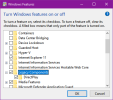
Search Windows Features on start menu and go to Legacy Components and enable DirectPlay.

Some of the older games will not even boot otherwise.

Disable DgVoodoo for now and see if the game boots with these enabled first. If not, then use dxvk to wrap the dx8 api to vulkan.
Dxvk link: https://github.com/doitsujin/DXVK
 
I did, but no. Still doesn't work. DXVK and d3d8to9, none of that worked. Even turning Windows Defender off/put the FIFA06 folder on exceptions solved.
 
I did, but no. Still doesn't work. DXVK and d3d8to9, none of that worked. Even turning Windows Defender off/put the FIFA06 folder on exceptions solved.

It's much more easier try to setup to separate disc (physical) Windows XP or Windows 7 and play in this old soccer games on appropriate operating system.
 
I did, but no. Still doesn't work. DXVK and d3d8to9, none of that worked. Even turning Windows Defender off/put the FIFA06 folder on exceptions solved.
see if booting these games on window mode works first. I had issues running fifa 2002 and 2002 world cup on fullscreen on windows 10 and had to resort to non conventional solutions.
 
see if booting these games on window mode works first. I had issues running fifa 2002 and 2002 world cup on fullscreen on windows 10 and had to resort to non conventional solutions.
I did, putting -windowed parameter on shortcut, but still crashes imediately,
 
I feel like this is a windows 11 issue. Because I had 2006 WC installed on my office PC [Intel UHD 730 or something like that] and the game was running as long as I used dxvk. It was playable last December.

Fast forward few months and I decided to boot that game on my office pc again and the game just shows black screen and doesn't boot anymore. There has been several windows updates in the mean time. I hadn't put much thought on it because I rarely use my office pc but now hearing your problems I feel like MS is the culprit.

And if that's really the case, then someone has to report to MS to fix their broken OS because that means no fix will work at all.

I can't test it on my home PC because I'm still stuck on Windows 10 because 11 doesn't support my CPU.
 
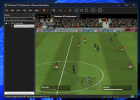
I installed on a virtual machine (VMWare) with Windows XP (512MB of RAM and for 3D Acceleration) and worked - i don't put a crack version and patched yet, but here is working on a VM:

1784648414981.png
 
I installed on a virtual machine (VMWare) with Windows XP (512MB of RAM and for 3D Acceleration) and worked - i don't put a crack version and patched yet, but here is working on a VM:

View attachment 433308
I put on low graphic settings, working fine, until i increase on FIFA 07 this time and then the VM crashes. Idk if playing on VM is worth, but yeah, is a try.
 
Bruh, looks like I'm cooked too.

2006 FIFA World cup, not booting. Screen goes black and the desktop resolution changes, and then the game process just ends and resolution goes back to normal. None of the fixes that I used before are working.

I'm on Windows 10. Did MS break the games on windows 10 too or is it the modern GPU drivers not working? I'm on 5070 ti, I also tested intel uhd 730 on my office pc and yours is intel gpu too. So looks like the problem persists on multiple OS and hardware configurations.
 
Ah man... That sucks. So, some old FIFA titles above 07 may have this issue too, i think.
 
Ah man... That sucks. So, some old FIFA titles above 07 may have this issue too, i think.
FIFA 10 seems to work. FIFA 09 works but have Tpose bug on all nvidia GPUs thanks to nvidia devs fucking their drivers up and not giving a shit to fix it.

FIFA 06, wc 06 and 07 used to work, idk what went wrong. Is it my gpu or my os I cant even figure out.
 
After restarting my PC, the game no longer just shows black screen and closes, now it shows "fifawc06.exe has stopped working" error after the black screen. Don't know what the fuck changed but it's a progress I guess?
 
After restarting my PC, the game no longer just shows black screen and closes, now it shows "fifawc06.exe has stopped working" error after the black screen. Don't know what the fuck changed but it's a progress I guess?
Idk, because for me, sometimes fifa06.exe stay stuck on black screen, then just closes, or very rarely the game start but crashes when enter in a match. Is so random, there is no pattern.
 
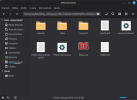
It’s been a while since my last post. I ended up putting the Windows 11 testing on hold; every attempt failed, and it was discouraging. In the end, I removed Windows 11 and installed Linux Mint. Thanks to my stubbornness, I installed Lutris with GE-Proton—including the DirectPlay and Vulkan packages. I installed the game's trial version, and it launched without a hitch. I let a match run, and it worked perfectly. I’ll test installing the full version in my language later to confirm. It’s funny, though—I tried installing it on Linux years ago, and it wouldn't work back then.

1787506683757.png
 
What a bummer. I wish there was a solution for windows because I dont wanna switch to linux.
Yes. Well, i cannot confirm. But i think the real problem is Windows 11, even with tweaks. I was not intended to switch operating systems, but since a bad update makes my brand new laptop slow and broken, i just had enough.
 
Not just windows 11, I tested windows 10 as well and the games dont run there either. Must of one of the security updates that broke both OS, because widows 10 doesn't really get any feature updates anymore.
 
Ironically Linux-based systems are becoming a better option for older Windows games than Windows itself thanks to Wine/Proton. Even better, they run on wrappers with their own settings/registry tweaks if needed, no risk to breaking anything on the main OS.
 
Back
Top Bottom